
AdsPower vs MuLogin vs Incogniton: 2026 Anti-Detect Comparison
Take a Quick Look
AdsPower vs MuLogin vs Incogniton compared on fingerprints, automation, team features, pricing, and free plans so you can pick the right anti-detect browser.
🔥 Limited-Time Offer! Save extra 10% off on your first monthly plan with code: Anitdetect10
Sign upAdsPower vs MuLogin vs Incogniton: Which Anti-Detect Browser Fits Your Workflow?
Choosing between AdsPower, MuLogin, and Incogniton usually comes down to one question: what does your multi-account operation actually need? All three create isolated browser profiles with spoofed fingerprints, but they differ in automation depth, team tooling, profile limits, and price. This comparison walks through those differences with practical scenarios, so you can match the tool to the job instead of guessing from spec sheets.
What All Three Anti-Detect Browsers Do Well
Before the differences, the shared foundation matters. AdsPower, MuLogin, and Incogniton all:
- Generate separate browser profiles, each with its own cookies, local storage, and cache
- Spoof fingerprint signals such as Canvas, WebGL, User Agent, and screen parameters so profiles do not look related
- Support proxy integration, so each profile can route through a different IP
- Target the same core audiences: e-commerce sellers, social media marketers, affiliate marketers, and agencies running many accounts
If you only need a handful of persistent, isolated profiles, any of the three can work. The decision gets interesting at scale, in team settings, and when automation enters the picture.
Fingerprint Isolation and Profile Management
AdsPower
AdsPower builds isolated environments with unique fingerprints covering Canvas, WebGL, User Agent, IP, and related signals. Profiles are designed to prevent cross-account association, which is the baseline requirement for platforms like Amazon, Facebook, Google, and TikTok. AdsPower reports more than 9 million users worldwide, and its profile model supports cross-device synchronization, so a profile opened on one machine can be picked up on another.
MuLogin Anti-detect Browser
MuLogin creates segregated browser environments with unique fingerprints and supports batch profile creation, which is useful when you need to spin up dozens of identities quickly rather than configuring them one at a time. It also offers sub-account management, letting a main account distribute profiles to team members without sharing raw credentials. Proxy integration is supported across multiple providers, and the help documentation is detailed enough to guide setup without support tickets.
Incogniton
Incogniton focuses on browser fingerprint spoofing and profile isolation in an interface built for people who are not browser engineers. Cookie management and proxy integration are part of the core package, and the platform's blog covers practical topics like WebRTC leakage prevention and working around platform restrictions. For privacy-conscious individuals and small marketing teams, the lower learning curve is a genuine advantage.
Automation and API Support
AdsPower vs MuLogin vs Incogniton: 2026 Anti-Detect Comparison - Automation and API Support.
This is where the three tools diverge most sharply.
AdsPower offers RPA (robotic process automation) and a Local API, which means you can script repetitive actions inside profiles, connect external automation stacks, and reduce manual clicking across large account portfolios. The platform has also introduced an AI Agent for conversational automation, letting you describe a task rather than code it. For affiliate marketers and agencies running the same workflow across hundreds of profiles, this is a structural advantage, not a nice-to-have.
MuLogin provides a REST API, which covers programmatic profile creation and management. That is enough for teams who want to automate provisioning rather than in-browser actions.
Incogniton supports Selenium integration, which appeals to developers already working in that ecosystem. It is a solid fit for scraping and scripted browsing, though it is not positioned as a full in-browser automation suite.
If automation is central to your operation, weight this section heavily. If you mostly need clean, isolated profiles for manual work, it matters far less.
Team Collaboration and Sub-Accounts
AdsPower vs MuLogin vs Incogniton: 2026 Anti-Detect Comparison - Team Collaboration and Sub-Accounts.
AdsPower includes team collaboration features alongside cross-device synchronization. That combination suits agencies where multiple operators touch the same profile pool and need consistent access without passing around passwords. For a closer look at how these features stack up against another toolset, see this AdsPower vs MuLogin vs BitBrowser comparison.
MuLogin's sub-account management is its team-facing strength. It lets you organize who can access which profiles, which is the practical need for most small and mid-sized teams.
Incogniton is more oriented toward individual operators and small teams. It handles multi-profile work well, but team governance is not its primary selling point.
Pricing and Free Plans
Pricing is where the three tools genuinely differ, and where your profile count drives the math.
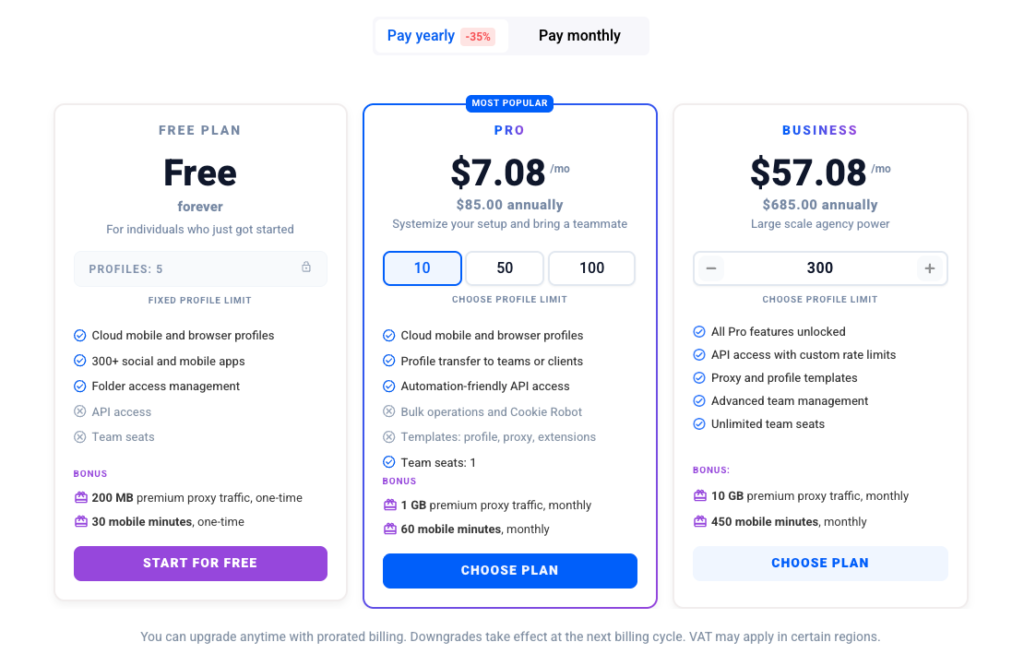
- AdsPower offers a free plan and paid subscriptions, with entry pricing that scales affordably as you add profiles. The free tier is enough to test the fingerprint quality and workflow before committing.
- MuLogin starts at $59/month for up to 100 profiles, with discounts for quarterly subscriptions. For teams that need a large profile count at a predictable monthly rate, that structure is straightforward.
- Incogniton is known for a generous free tier, which makes it a common first stop for people testing whether anti-detect browsing fits their workflow at all.
If you are running a small number of high-value accounts, the free tiers of AdsPower and Incogniton let you validate the tool before paying. If you need 100 profiles immediately, MuLogin's plan is easy to reason about.
Which Anti-Detect Browser Should You Choose?
Use these scenarios as a shortcut:
Choose AdsPower if you need automation at scale. RPA, Local API, and the AI Agent are built for teams running repeatable workflows across many profiles, and the team collaboration and cross-device synchronization features support agency structures. It is also the natural pick if you want a free plan to start and paid tiers that grow with your profile count.
Choose MuLogin if you want batch profile creation, sub-account management, and a flat per-profile pricing model. The detailed documentation and multi-language support reduce setup friction, and the $59/month tier for 100 profiles is easy to budget.
Choose Incogniton if you are an individual operator or small team that wants a simple interface, a strong free tier, and Selenium support for scripted work. It is a reasonable entry point before scaling into a heavier platform.
For a broader view of how anti-detect browsers fit into a full multi-account operation, including proxy strategy and account lifecycle management, see this cross-border e-commerce and multi-account operations guide.
Practical Setup Tips for Any of the Three
Whichever tool you pick, the browser is only part of the equation. A few habits make the biggest difference:
- Match proxy geography to profile identity. A profile claiming to be in one country while routing through another is an easy inconsistency to flag.
- Use residential or mobile proxies for account-heavy work. Datacenter IPs are cheaper but more likely to be flagged on social and e-commerce platforms.
- Keep one profile per account. Mixing accounts inside a single profile defeats the purpose of isolation.
- Warm up new profiles gradually. Sudden bursts of activity on a fresh identity look unnatural.
- Test your fingerprint before committing. Run a profile through a fingerprint checker with a clean proxy to confirm consistency.
If you are pairing AdsPower with a proxy provider, this AdsPower and Decodo integration guide walks through setup, rotation, and troubleshooting.
Related reading
- How to Use AccsMarket: Buy Accounts Safely in 2026 - Step-by-step guide to buying accounts on AccsMarket, plus proxy, device isolation, and anti-detect browser tips to keep purchased accounts alive.
Sources and further reading
- 10 Best Antidetect Browsers in 2026 (Tested + Free Picks) - Multilogin, GoLogin, and AdsPower lead our tested ranking of the best antidetect browsers in 2026, compared on pricing, free plans, and Android support.
- 12 Best Antidetect Browsers 2026: Complete Comparison & Pricing Guide - Compare 30+ antidetect browsers for multi-accounting in 2026. GoLogin, Multilogin, AdsPower, Dolphin Anty, Octo Browser, Undetectable. Verified pricing & features.
- Detailed Comparison of Top Anti-detect Browsers & Privacy Tools - Discover in-depth comparisons of the best anti-detect browsers and privacy tools! Our expert reviews, real-world testing, and user feedback help you make informed decisions for optimal online security and privacy.
FAQ
Is AdsPower better than MuLogin and Incogniton?
It depends on your workload. AdsPower has the strongest automation story of the three, with RPA, Local API, and an AI Agent, plus team collaboration and cross-device synchronization. MuLogin competes on batch profile creation, sub-account management, and predictable pricing. Incogniton competes on simplicity and a generous free tier. None is universally better.
Which of the three has the best free plan?
Incogniton is widely noted for its free tier, and AdsPower also offers a free plan for testing. If you want to validate fingerprint quality before paying, either is a reasonable starting point.
Can I use these browsers for affiliate marketing?
Yes. All three target affiliate marketers who need to run multiple campaigns or accounts without triggering association. AdsPower's automation features are particularly relevant if you manage many campaigns with repetitive tasks.
Do I still need proxies if I use an anti-detect browser?
Yes. Fingerprint spoofing and IP separation solve different problems. An anti-detect browser makes each profile look like a distinct device; a proxy makes each profile look like it is coming from a distinct network location. You generally need both.
How many profiles can I run at once?
That depends on your plan and your hardware. MuLogin's entry plan covers up to 100 profiles, while AdsPower and Incogniton scale through their paid tiers. In practice, your proxy pool and available system resources often become the limiting factor before the profile cap does.
Conclusion
AdsPower, MuLogin, and Incogniton all solve the core problem of running multiple accounts without cross-contamination. The right choice comes down to your operating model: AdsPower for automation-heavy, team-based operations with a free entry point; MuLogin for batch profile creation, sub-account management, and flat pricing at 100 profiles; Incogniton for individuals and small teams who value a simple interface and a strong free tier. Test with a clean proxy, verify your fingerprint consistency, and let your actual workflow, not the feature list, make the final call.