
SOCKS5 Proxy: What It Is, How It Works & Setup Guide
Take a Quick Look
Learn what a SOCKS5 proxy is, how it compares to HTTP proxies and VPNs, and how to set one up for scraping, multi-accounting, and privacy.
🔥 Limited-Time Offer! Save extra 10% off on your first monthly plan with code: Anitdetect10
Sign upSOCKS5 Proxy: What It Is, How It Works, and How to Set One Up
A SOCKS5 proxy is a network protocol that routes your internet traffic through an intermediary server before it reaches its destination. Unlike older proxy types that only handle web traffic, SOCKS5 works at the session layer and can carry almost any kind of TCP or UDP traffic, from browser requests to torrents, live calls, and data scraping jobs. That flexibility is why SOCKS5 remains a go-to option for developers, researchers, and multi-account operators who need speed, compatibility, and a clean IP address without the overhead of a full VPN.
This guide explains what a SOCKS5 proxy actually does, how it differs from HTTP proxies and VPNs, when it is the right tool, and how to configure one in common browsers and applications.
What Is a SOCKS5 Proxy?
SOCKS5 Proxy: What It Is, How It Works & Setup Guide - What Is a SOCKS5 Proxy?.
SOCKS stands for "Socket Secure." Version 5, the current standard, adds several improvements over the older SOCKS4 protocol: support for UDP traffic, domain name resolution, and optional username/password authentication.
When you connect through a SOCKS5 proxy, the proxy server receives your data packets and forwards them to the target server on your behalf. The target server sees the proxy's IP address, not yours. This makes SOCKS5 useful for:
- Masking your real IP address
- Accessing geo-restricted content or region-specific services
- Reducing CAPTCHAs when traffic comes from a stable, trusted IP
- Running traffic-intensive tasks like web scraping, streaming, or P2P transfers
- Managing multiple online accounts without IP-based bans
Because SOCKS5 operates below the application layer, it does not inspect or modify the data inside your packets. That means it works with nearly any protocol or application that supports proxy settings, including browsers, email clients, FTP tools, and custom scripts.
How SOCKS5 Differs from HTTP Proxies and VPNs
SOCKS5 Proxy: What It Is, How It Works & Setup Guide - How SOCKS5 Differs from HTTP Proxies and VPNs.
Understanding the differences helps you choose the right tool for the job.
SOCKS5 vs HTTP Proxy
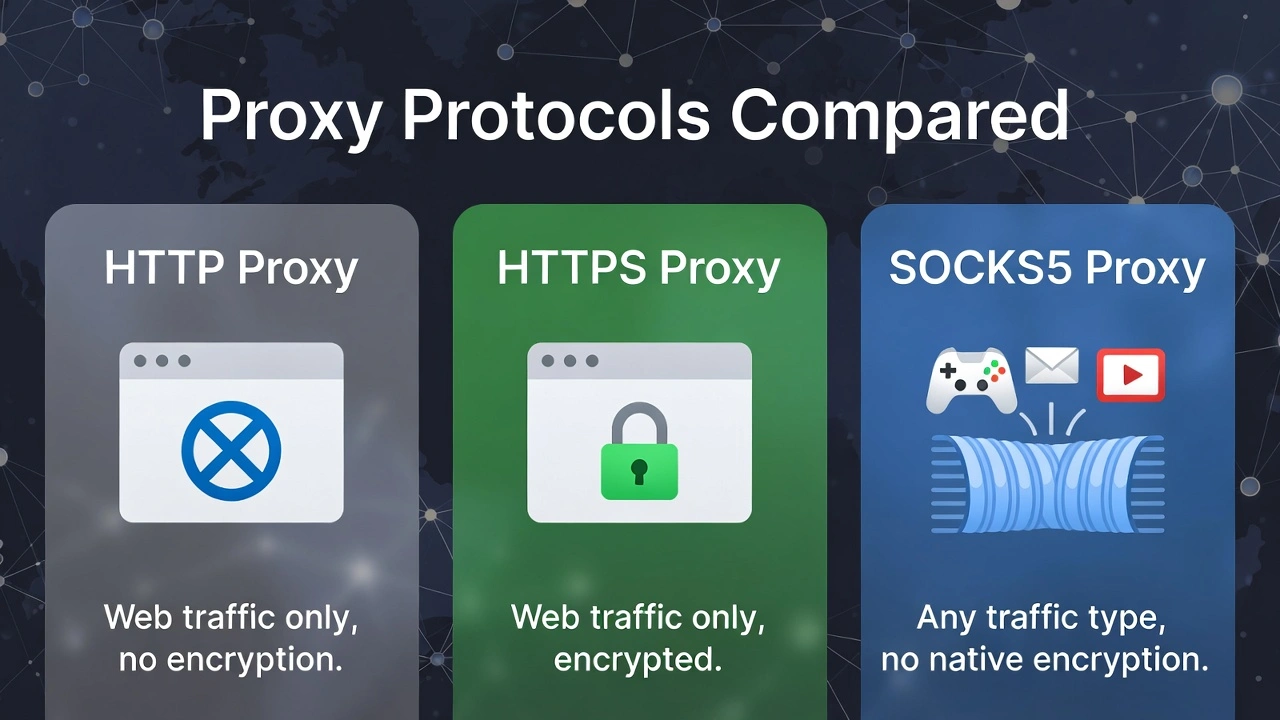
An HTTP proxy is designed for web traffic only. It understands HTTP and HTTPS requests, which allows it to cache content, filter requests, and sometimes modify headers. A SOCKS5 proxy is more generic: it tunnels raw TCP and UDP packets without interpreting them.
When to choose SOCKS5:
- You need to route non-web traffic, such as torrents, game clients, or custom applications.
- You want lower overhead and faster throughput for bulk data transfer.
- You are using tools that require SOCKS support, such as certain scrapers or automation frameworks.
When to choose HTTP:
- You only need to proxy browser traffic.
- You want content filtering or caching.
- Your tooling only supports HTTP proxies.
SOCKS5 vs VPN
A VPN encrypts all traffic at the system level and routes it through a secure tunnel. A SOCKS5 proxy, by default, does not encrypt your traffic. It only changes your visible IP address.
SOCKS5 advantages:
- Often faster because there is no encryption overhead.
- Easier to configure per application rather than system-wide.
- Can be combined with other tools for layered workflows.
VPN advantages:
- Encrypts traffic end-to-end, protecting data from interception on public networks.
- Covers all applications on the device automatically.
- Better for general privacy on untrusted Wi-Fi.
Some providers combine both. For example, Mullvad offers a SOCKS5 proxy that only works inside its encrypted WireGuard tunnel, giving you the flexibility of SOCKS5 with the encryption of a VPN. In that setup, the proxy itself does not encrypt, but the surrounding VPN tunnel does.
Key SOCKS5 Features to Look For
SOCKS5 Proxy: What It Is, How It Works & Setup Guide - Key SOCKS5 Features to Look For.
Not all SOCKS5 proxies are equal. When evaluating a provider or setting up your own, consider these factors:
Authentication
SOCKS5 supports username/password authentication. This prevents unauthorized users from using your proxy and is essential for any paid or shared proxy service. Some providers also support IP whitelisting, where only requests from pre-approved IP addresses are accepted.
UDP Support
SOCKS5 can carry UDP traffic, which is useful for live calls, gaming, DNS queries, and certain streaming protocols. If your use case involves UDP, confirm that the provider supports it. Many residential SOCKS5 proxies only support TCP, while dedicated datacenter proxies often support both.
Static vs Rotating IPs
- Static (sticky) IPs: The same IP address is used for every request during a session. This is ideal for account management, where a consistent IP builds trust with platforms.
- Rotating IPs: The IP changes automatically after a set interval or per request. This is better for large-scale scraping where you want to avoid rate limits.
Residential vs Datacenter IPs
- Datacenter IPs: Hosted in data centers. Fast and affordable, but easier for websites to flag as proxy traffic.
- Residential IPs: Assigned to real home internet connections. More trusted by websites, but slower and more expensive.
- ISP/static residential IPs: A middle ground that combines residential trust with datacenter speed.
DNS Leak Protection
When you use a SOCKS5 proxy, your device may still send DNS queries to your local DNS server, revealing which sites you visit. Some clients let you enable "remote DNS" or "proxy DNS" so that DNS resolution happens through the proxy instead. This is especially important if you are trying to hide your browsing activity from your ISP.
Common SOCKS5 Proxy Use Cases

SOCKS5 Proxy: What It Is, How It Works & Setup Guide - Common SOCKS5 Proxy Use Cases.
Web Scraping and Data Collection
SOCKS5 proxies are widely used for scraping because they handle high connection volumes efficiently. Rotating residential SOCKS5 proxies let you send requests from many different IPs, reducing the chance of being blocked by anti-bot systems. Datacenter SOCKS5 proxies offer high speed for large-scale, less sensitive collection tasks.
Multi-Account Management
Platforms like Facebook, Amazon, Google, and TikTok track IP addresses to detect suspicious account activity. If many accounts log in from the same IP, the platform may flag or ban them. Assigning each account a dedicated SOCKS5 proxy IP keeps the accounts isolated and reduces ban risk.
This is where an anti-detect browser becomes valuable. Tools like AdsPower create isolated browser profiles, each with its own digital fingerprint, cookies, and proxy settings. Pairing AdsPower with SOCKS5 proxies gives you both IP isolation and fingerprint isolation, which is much stronger than using a proxy alone. For a step-by-step example of combining AdsPower with a proxy provider, see our guide on how to use AdsPower with IPBurger proxy services.
P2P and Torrenting
SOCKS5 proxies support the TCP and UDP traffic that torrent clients use. While a SOCKS5 proxy does not encrypt your traffic, it does hide your real IP from peers in the swarm. For stronger privacy, combine it with a VPN or choose a provider that tunnels the proxy through an encrypted connection.
Bypassing Geo-Restrictions
Because the target server sees the proxy's IP, you can use a SOCKS5 proxy located in another country to access region-locked content or test localized versions of websites and ads.
Social Media Automation
Automation tools for scheduling posts, managing multiple client accounts, or running engagement workflows often support SOCKS5 proxies. A stable, dedicated IP for each account reduces the chance of login challenges and CAPTCHAs.
How to Set Up a SOCKS5 Proxy
In Firefox
- Open Firefox and go to Settings.
- Search for "network" and click Settings next to Network Settings.
- Select Manual proxy configuration.
- Leave the HTTP Proxy and HTTPS Proxy fields empty.
- In the SOCKS Host field, enter your proxy IP address.
- Enter the port (commonly 1080, but your provider may use a different one).
- Select SOCKS v5.
- Optionally enable Proxy DNS when using SOCKS v5 to prevent DNS leaks.
- Click OK.
In Chrome or Brave (Windows)
Chrome does not have a built-in SOCKS5 setting in its normal preferences, but you can launch it with a command-line flag:
- Right-click your Chrome or Brave desktop shortcut and select Properties.
- In the Target field, add a space at the end and then append:
--proxy-server=socks5://YOUR_PROXY_IP:PORT
- Click OK and launch the browser from that shortcut.
For a more flexible setup, you can use a browser extension like FoxyProxy to switch between proxies without editing shortcuts.
In Windows System Settings
- Open Settings > Network & Internet > Proxy.
- Under Manual proxy setup, click Set up.
- Enable Use a proxy server.
- Enter the proxy address in the format
socks=YOUR_PROXY_IPand the port. - Click Save.
Note that system-level proxy settings apply to all applications that respect Windows proxy configuration.
In macOS
- Open System Settings > Network.
- Select your active connection and click Details.
- Go to the Proxies tab.
- Enable SOCKS proxy.
- Enter the server address and port.
- Click OK.
In Applications and Scripts
Many applications have their own proxy settings. For command-line tools, you can often pass the proxy inline:
curl --socks5-hostname YOUR_PROXY_IP:PORT https://example.com
For Python requests, you can use the requests library with the socks extra:
import requests

proxies = {
    "http": "socks5://user:pass@proxy_ip:port",
    "https": "socks5://user:pass@proxy_ip:port"
}

response = requests.get("https://example.com", proxies=proxies)
For browser automation with Selenium or Puppeteer, you can pass the SOCKS5 proxy as a launch argument. AdsPower's Local API also supports proxy configuration per profile, which is useful for web automation workflows that require clean, isolated IPs.
SOCKS5 Proxy Security Considerations
A common misconception is that SOCKS5 proxies encrypt your traffic. They do not. The SOCKS5 protocol handles authentication between you and the proxy server, but the data traveling from the proxy to the destination is not encrypted by the proxy itself.
This means:
- Your ISP can still see that you are connecting to a proxy server, though not the final destination if remote DNS is enabled.
- Anyone who can intercept traffic between you and the proxy can see unencrypted data.
- Websites using HTTPS still encrypt traffic between the proxy and the destination, but only for HTTPS connections.
To improve security:
- Always use HTTPS websites when possible.
- Enable remote DNS resolution in your client.
- Choose a provider that supports strong authentication.
- Consider combining SOCKS5 with a VPN tunnel if privacy is critical.
- Never use free, unknown SOCKS5 proxies for sensitive accounts. Free proxies may log your traffic or inject malicious content.
SOCKS5 Proxy Pricing: What to Expect
Pricing varies widely based on IP type, pool size, and features. As a rough guide:
- Datacenter SOCKS5 proxies: Often sold per proxy per month. Entry-level plans can start around $3 per month for 100 proxies, with per-proxy costs dropping to under $0.02 at high volumes.
- Residential SOCKS5 proxies: Usually priced per gigabyte of traffic, often starting around $1.50 to $8 per GB depending on targeting options and pool quality.
- ISP/static residential proxies: Typically priced per IP per month, often $2 to $10 per IP.
Many providers offer free trials or small free tiers so you can test speed and compatibility before committing. When comparing plans, look at bandwidth limits, thread limits, IP authorization options, and whether SOCKS5 is included at no extra cost.
SOCKS5 Proxy and Anti-Detect Browsers
Using a SOCKS5 proxy alone changes your IP address, but it does not change your browser fingerprint. Websites can still identify you through Canvas, WebGL, user agent, fonts, and dozens of other signals. For multi-account workflows, this is a critical gap.
Anti-detect browsers solve this by creating isolated browser profiles, each with a unique fingerprint. When you combine an anti-detect browser with a SOCKS5 proxy, each profile gets:
- A unique IP address from the proxy
- A unique browser fingerprint from the anti-detect browser
- Separate cookies, local storage, and session data
AdsPower is one of the most widely used anti-detect browsers for this purpose. It supports SOCKS5, HTTP, HTTPS, and SSH proxies, and lets you assign a different proxy to each profile. You can also use its Local API to automate profile creation and proxy assignment, which is helpful for teams managing hundreds of accounts. If you are comparing options, our AdsPower vs Multilogin vs Genlogin comparison breaks down the key differences.
Related reading
- How to Use AdsPower with Textverified: Full Workflow - Learn how to pair AdsPower anti-detect browser with Textverified phone numbers for ban-resistant account creation, verification, and multi-account management.
- AdsPower vs RoxyBrowser vs Dolphin Anty: Which Wins in 2026? - Compare AdsPower, RoxyBrowser, and Dolphin Anty across fingerprint isolation, automation, pricing, and team features to choose the right antidetect browser.
Sources and further reading
- Buy SOCKS5 Proxies - Residential & Datacenter IP - API Access - Buy SOCKS5 proxies with residential and datacenter IPs, API access and 99.97% uptime. Start free with no credit card, from $0.0179 per proxy.
- SOCKS5 proxy - Use our SOCKS5 proxies to further minimize your computer's identity from being revealed and reduce CAPTCHAs.
- Buy Best Premium SOCKS5 Proxies - Residential, Dedicated & Private IPs - Buy premium SOCKS5 proxies from Oxylabs for all your versatile and traffic-intensive data gathering needs. Residential or dedicated IPs available from $1.5/GB, no commitment!
Frequently Asked Questions
Does a SOCKS5 proxy hide my IP address?
Yes. When configured correctly, the destination server sees the SOCKS5 proxy's IP address instead of your real IP. However, DNS leaks or misconfigured applications can still expose your IP, so always test your setup after configuration.
Is SOCKS5 better than a VPN?
It depends on your goal. SOCKS5 is often faster and more flexible for specific applications, but it does not encrypt traffic by default. A VPN provides system-wide encryption. For privacy on public Wi-Fi, a VPN is better. For speed-sensitive tasks like scraping or streaming, SOCKS5 can be a better fit.
Can a SOCKS5 proxy be detected?
Datacenter IPs are easier to detect as proxy traffic because they come from known hosting ranges. Residential SOCKS5 proxies are harder to detect because they use IPs assigned to real internet service providers. No proxy is completely undetectable, especially if your browser fingerprint is inconsistent.
Is using a SOCKS5 proxy legal?
In most countries, using a proxy is legal. What matters is how you use it. Violating a website's terms of service, scraping protected data, or engaging in fraud can be illegal regardless of the proxy type. Always check local laws and the terms of the platforms you access.
Can I get a free SOCKS5 proxy?
Free SOCKS5 proxies exist, but they come with serious risks: slow speeds, unreliable uptime, possible traffic logging, and even malicious injection. For anything beyond casual testing, a paid provider with clear privacy policies is strongly recommended.
How do I test if my SOCKS5 proxy is working?
Visit an IP-checking website while the proxy is active. If the displayed IP matches your proxy's IP and not your real one, the proxy is working. Also test for DNS leaks using a dedicated leak test tool.
Can I use SOCKS5 with residential IPs?
Yes. Many providers offer residential SOCKS5 proxies that route traffic through real residential IPs. These are more trusted by websites and are commonly used for scraping, ad verification, and account management.
Conclusion
A SOCKS5 proxy is a versatile, low-overhead way to change your visible IP address and route almost any kind of traffic through an intermediary server. It shines in scenarios where speed, protocol flexibility, and per-application control matter more than full encryption: web scraping, P2P transfers, geo-testing, and multi-account management.
For basic IP masking, a standalone SOCKS5 proxy is enough. For account-heavy workflows, pairing SOCKS5 proxies with an anti-detect browser like AdsPower gives you both IP isolation and fingerprint isolation, which dramatically reduces ban risk. Whichever route you choose, test your setup for IP and DNS leaks, use authentication, and avoid free proxies for anything sensitive.