
AdsPower vs Incogniton vs BitBrowser: 2026 Comparison
Take a Quick Look
Compare AdsPower, Incogniton, and BitBrowser on fingerprints, automation, team features, free plans, and pricing to pick the right anti-detect browser.
🔥 Limited-Time Offer! Save extra 10% off on your first monthly plan with code: Anitdetect10
Sign upAdsPower vs Incogniton vs BitBrowser: Which Anti-Detect Browser Fits Your Workflow?
Choosing between AdsPower, Incogniton, and BitBrowser usually comes down to one question: what does your multi-account operation actually look like day to day? All three create isolated browser profiles with spoofed fingerprints, but they optimize for different users — from solo freelancers running a handful of social accounts to teams automating thousands of profiles.
This comparison breaks down where each tool is genuinely strong, so you can match the browser to your account volume, budget, and technical comfort level.
What All Three Anti-Detect Browsers Do Well
AdsPower vs Incogniton vs BitBrowser: 2026 Comparison - What All Three Anti-Detect Browsers Do Well.
Before the differences, it helps to see the shared foundation. AdsPower, Incogniton, and BitBrowser all:
- Generate unique browser fingerprints per profile, covering parameters like Canvas, WebGL, AudioContext, User Agent, and timezone
- Isolate cookies, local storage, and cache so profiles never leak data into each other
- Support proxy integration (HTTP, HTTPS, SOCKS5) so each profile can carry its own IP
- Let you organize profiles into groups for different platforms — Amazon, Facebook, TikTok, Google Ads, and similar
If your needs stop there, any of the three will work. The decision gets interesting when you add automation, team collaboration, mobile environments, or scale.
AdsPower: Built for Automation and Team Operations
AdsPower vs Incogniton vs BitBrowser: 2026 Comparison - AdsPower: Built for Automation and Team Operations.
AdsPower is positioned around scale. Its standout capability is built-in automation: no-code RPA workflows and a Local API let you script repetitive tasks like logging in, posting, warming up accounts, or scraping data without writing a full automation stack from scratch. The platform has also introduced an AI Agent for conversational automation, which lowers the barrier for users who don't want to build flows manually.
Beyond automation, AdsPower supports team collaboration with permission management and cross-device synchronization, so an operator can start a profile on one machine and continue on another. It integrates with proxy providers and is used across e-commerce, social media marketing, affiliate marketing, and web scraping.
Where AdsPower stands out:
- No-code RPA plus Local API for automation at scale
- Team roles and profile sharing for agencies
- Cross-device sync for distributed teams
- Free plan available, with paid tiers for higher profile counts
For a deeper look at pairing AdsPower with external tooling, see our guide on using AdsPower with Scrapestack for scraping workflows, or AdsPower with Shopify if you run multiple storefronts.
Incogniton: Simple Setup with a Generous Free Tier
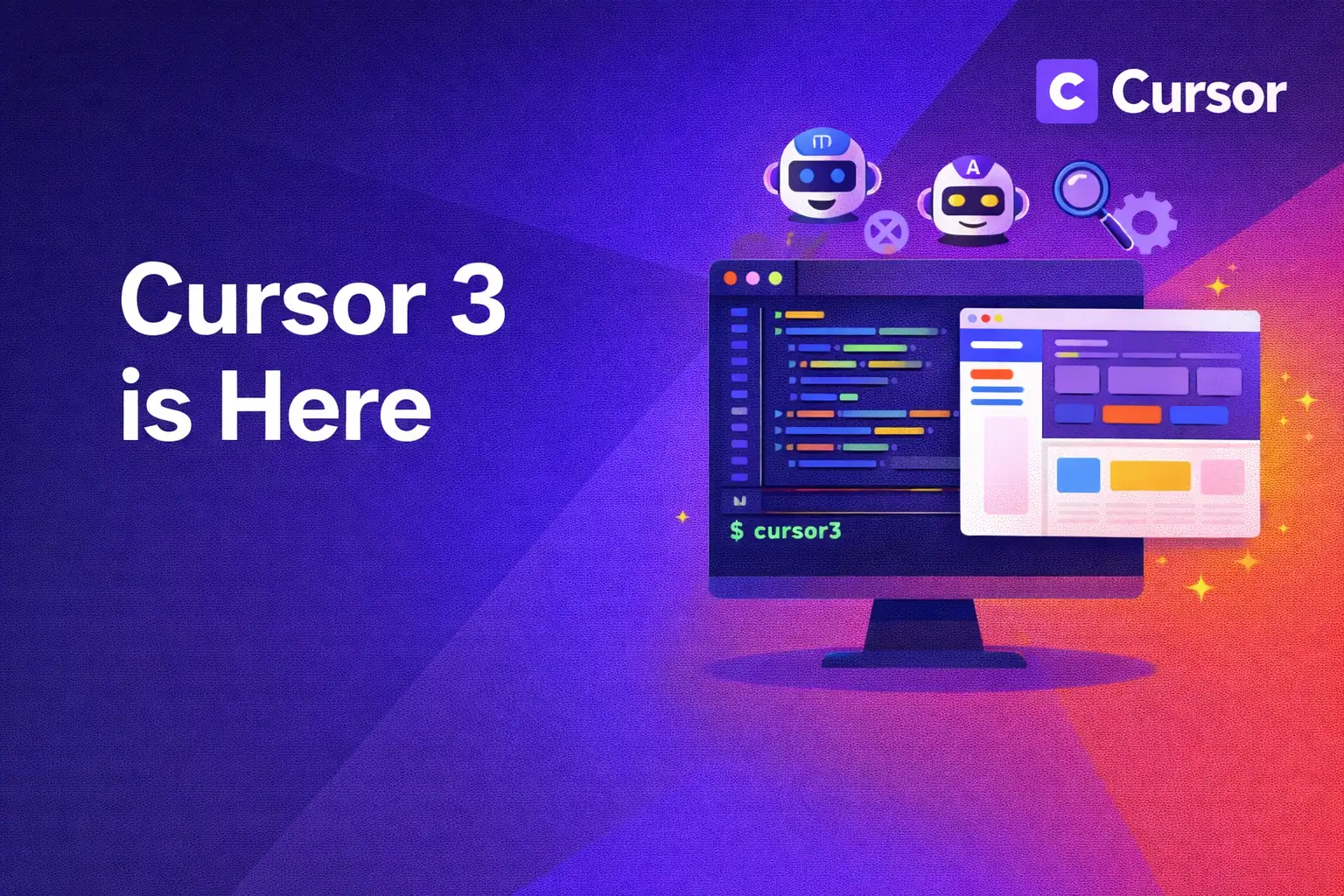
AdsPower vs Incogniton vs BitBrowser: 2026 Comparison - Incogniton: Simple Setup with a Generous Free Tier.
Incogniton targets users who want anti-detect protection without a steep learning curve. Its interface is straightforward, onboarding is quick, and the free tier is one of the more generous entry points in the category — which makes it popular with freelancers, solo affiliate marketers, and small teams testing multi-account workflows for the first time.
Feature-wise, Incogniton covers the essentials well: browser fingerprint spoofing, profile isolation, cookie management, and proxy integration. It also supports Selenium integration, which matters if you already automate with Python or another Selenium-based stack and want to drive profiles programmatically. Its blog and documentation address practical topics like WebRTC leakage prevention and platform-specific restrictions, which suggests a user base focused on day-to-day account survival rather than enterprise-scale operations.
Where Incogniton stands out:
- Very easy onboarding for non-technical users
- Generous free plan for testing and small operations
- Selenium integration for existing automation code
- Clear documentation on fingerprint leakage and platform restrictions
If you're comparing Incogniton against other mid-tier options, our AdsPower vs MuLogin vs Incogniton comparison covers the fingerprint and pricing differences in more detail.
BitBrowser: Free Profiles, Script Marketplace, and Cloud Phones
AdsPower vs Incogniton vs BitBrowser: 2026 Comparison - BitBrowser: Free Profiles, Script Marketplace, and Cloud Phones.
BitBrowser's pitch is accessibility. It offers 10 free permanent browser profiles, which is enough for many small operators to run a real workflow without paying anything. Each profile simulates 20+ fingerprint parameters including WebGL, Canvas, Audio, Timezone, and proxy settings, so profiles appear as distinct users.
What differentiates BitBrowser beyond price is its ecosystem. It supports all major proxy protocols (HTTP, HTTPS, SOCKS5, SSH), includes RPA automation, and offers an extensions/script marketplace where users can share or install automation scripts. Team collaboration with permission management is available, and BitBrowser also provides BitCloudPhone — an Android emulator and iOS cloud phone service for mobile multi-account management, which is useful for platforms that weight mobile signals heavily.
Support is another strength: video tutorials, community groups on WeChat, Telegram, and WhatsApp, and a help center. Partnerships with proxy providers like IPDEEP and daily activity rewards round out the value proposition for cost-sensitive users.
Where BitBrowser stands out:
- 10 free permanent profiles with no time limit
- Script and extension marketplace for reusable automation
- BitCloudPhone for mobile and cloud phone environments
- Broad proxy protocol support including SSH
- Active community support channels
Head-to-Head Comparison
| Criteria | AdsPower | Incogniton | BitBrowser |
|---|---|---|---|
| Free plan | Yes | Yes, generous | Yes, 10 permanent profiles |
| Fingerprint parameters | Canvas, WebGL, UA, IP, and more | Fingerprint spoofing, cookie management | 20+ parameters (WebGL, Canvas, Audio, Timezone, Proxy) |
| Automation | No-code RPA, Local API, AI Agent | Selenium integration | RPA, script marketplace |
| Team features | Roles, permissions, cross-device sync | Basic multi-profile management | Team collaboration with permissions |
| Mobile environments | — | — | BitCloudPhone (Android/iOS) |
| Proxy protocols | HTTP, HTTPS, SOCKS5 | HTTP, HTTPS, SOCKS5 | HTTP, HTTPS, SOCKS5, SSH |
| Best for | Automation-heavy teams and agencies | Beginners and freelancers | Budget-conscious users and mobile workflows |
How to Choose
Pick AdsPower if: you run a team, need automation at scale, or want cross-device synchronization. The RPA and API layer saves significant time when you're managing dozens or hundreds of profiles with repetitive tasks.
Pick Incogniton if: you're starting out, want a clean interface, or already automate with Selenium. The free tier lets you validate your workflow before committing to a paid plan.
Pick BitBrowser if: budget is the primary constraint, you want a script marketplace, or you need mobile/cloud phone environments. The 10 permanent free profiles and BitCloudPhone make it a strong fit for mobile-first operations.
A practical approach: start with the free tier of each, run the same workflow across all three, and measure which one keeps your accounts stable over two to four weeks. Fingerprint quality matters, but so does how well the tool fits your daily routine.
Practical Tips for Any Anti-Detect Browser
- Match proxies to profiles consistently. A residential proxy that stays with one profile is safer than rotating IPs mid-session.
- Warm up new accounts gradually. Sudden bursts of activity on a fresh profile look unnatural regardless of fingerprint quality.
- Keep fingerprints stable per profile. Changing Canvas or WebGL values between sessions can trigger suspicion.
- Separate work and personal browsing. Don't mix real logins into anti-detect profiles.
- Document your setup. When you scale to dozens of profiles, a spreadsheet mapping profile, proxy, and platform prevents costly mistakes.
For privacy-focused account management on social platforms, our Instagram privacy settings guide covers the account-side controls that complement browser isolation.
Related reading
- AdsPower vs Linken Sphere vs Indigo: Antidetect Browser Comparison - We compare AdsPower, Linken Sphere, and Indigo: fingerprints, automation, teams, pricing, and use cases. Find out which antidetect browser to choose in 2026.
- Puppeteer Pricing: What It Really Costs in 2026 - Puppeteer is free and open source. Compare real costs of Puppeteer AI, cloud browser services, proxies, and anti-detect browsers for multi-account work.
Sources and further reading
- Top 10 Anti‑Detect Browsers to Watch in 2026 - Discover the top 10 anti‑detect browsers in 2026. Compare features, pricing, fingerprint accuracy, and team collaboration tools to find the best browser for multi‑account operations and online privacy.
- Best Antidetect Browser 2026: AdsPower vs Multilogin vs Incogniton - Try AdsPower and run multiple accounts without bans:https://share.adspower.net/saasreport ^ Don't forget to use our referral code: SAASREPORT for additional ...
- 12 Best Antidetect Browsers 2026: Complete Comparison & Pricing Guide - Compare 30+ antidetect browsers for multi-accounting in 2026. GoLogin, Multilogin, AdsPower, Dolphin Anty, Octo Browser, Undetectable. Verified pricing & features.
FAQ
Is AdsPower better than Incogniton and BitBrowser?
It depends on your needs. AdsPower has stronger automation and team features, which matters for agencies and high-volume operations. Incogniton is easier to start with, and BitBrowser offers more free profiles and mobile environments. None is universally "better" — the fit depends on your workflow.
Which has the best free plan?
BitBrowser offers 10 free permanent profiles with no time limit. Incogniton also has a generous free tier. AdsPower provides a free plan as well, with paid tiers for higher limits. If you want to test extensively before paying, BitBrowser and Incogniton are the most forgiving starting points.
Can I use these browsers for Amazon, Facebook, and TikTok?
Yes. All three support the profile isolation and fingerprint spoofing needed for multi-account management on major platforms. The key is assigning a consistent, high-quality proxy to each profile and avoiding behavioral patterns that platforms flag.
Do I need technical skills to use them?
Incogniton is the most beginner-friendly. BitBrowser is also accessible, especially with its video tutorials and community support. AdsPower's automation features reward users who are comfortable with APIs or RPA, though basic profile management doesn't require coding.
Which browser supports mobile environments?
BitBrowser offers BitCloudPhone, an Android emulator and iOS cloud phone service. AdsPower and Incogniton focus primarily on desktop browser profiles.
How many profiles can I run?
All three support scaling to hundreds or thousands of profiles depending on your plan. Practical limits depend on your device resources, proxy budget, and how much manual oversight each account needs.
Conclusion
AdsPower, Incogniton, and BitBrowser each solve the core problem of multi-account management — isolated profiles with unique fingerprints — but they serve different operators. AdsPower leads on automation and team infrastructure. Incogniton wins on simplicity and onboarding. BitBrowser delivers the most generous free tier plus mobile cloud phone capability.
The smartest move is to test all three free tiers against your actual workflow. Whichever keeps your accounts stable with the least friction is the right choice for your operation.