
How to Use AdsPower with CapSolver: Full Setup Guide
Take a Quick Look
Learn how to combine AdsPower anti-detect browser with CapSolver's AI CAPTCHA solver for seamless multi-account and scraping workflows.
🔥 Limited-Time Offer! Save extra 10% off on your first monthly plan with code: Anitdetect10
Sign upHow to Use AdsPower with CapSolver
Managing multiple accounts or running automated scraping tasks often hits the same wall: CAPTCHAs. AdsPower gives you isolated browser profiles with unique fingerprints, but it cannot solve CAPTCHA challenges on its own. CapSolver fills that gap with an AI-powered solving API that handles reCAPTCHA, hCaptcha, Cloudflare Turnstile, AWS WAF, and many other challenge types. Together, they form a workflow where your anti-detect browser stays invisible while CAPTCHAs are cleared automatically in seconds.
This guide walks through why the combination works, how to set it up step by step, practical use cases, and the problems it solves.
Why Combine AdsPower and CapSolver?
How to Use AdsPower with CapSolver: Full Setup Guide - Why Combine AdsPower and CapSolver?.
AdsPower creates isolated browser environments with independent digital fingerprints such as Canvas, WebGL, user agent, time zone, and resolution. This prevents platforms from linking your accounts to a single device. However, when a site throws a CAPTCHA at one of your profiles, you still need to solve it manually unless you have an automated solver.
CapSolver provides an API and browser extension that solve CAPTCHAs using AI and machine learning. It supports reCAPTCHA v2, v3, hCaptcha, FunCaptcha, DataDome, GeeTest, Cloudflare Challenge and Turnstile, AWS WAF, and image-to-text decoding. The service reports solving speeds under three seconds and success rates above 99%.
When you pair them:
- AdsPower keeps each profile isolated and fingerprint-consistent.
- CapSolver removes the friction of manual CAPTCHA solving inside those profiles.
- Proxy support in AdsPower masks each profile's IP, while CapSolver handles the challenge that appears after the request.
The result is a smoother workflow for affiliate marketing, e-commerce account management, social media operations, and web scraping at scale.
How the Integration Works
How to Use AdsPower with CapSolver: Full Setup Guide - How the Integration Works.
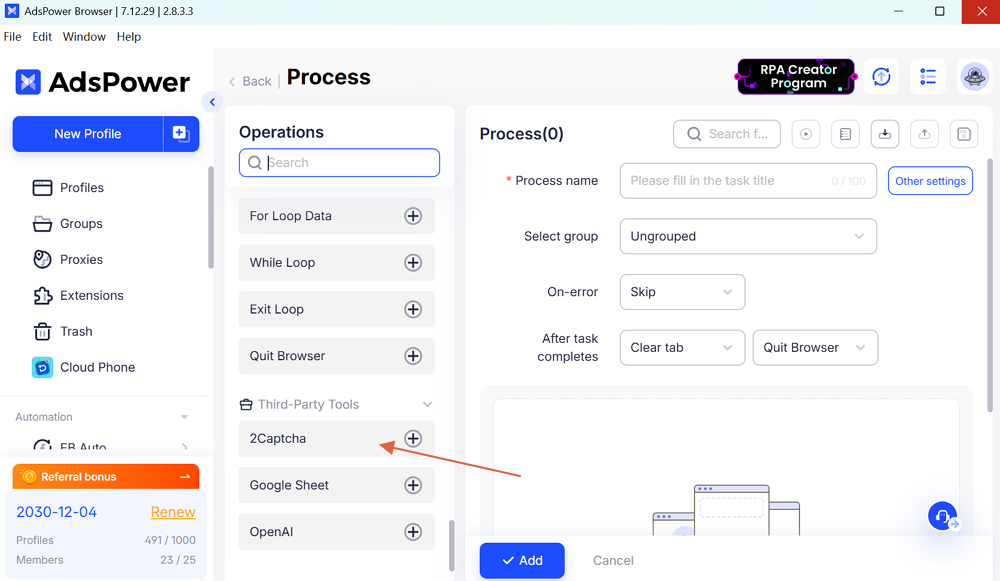
There are two main ways to use CapSolver inside AdsPower:
- CapSolver Browser Extension — install the extension into an AdsPower profile so CAPTCHAs are solved automatically as you browse.
- CapSolver API with Automation Scripts — use AdsPower's Local API with Selenium, Puppeteer, or Playwright and call CapSolver's API from your script to solve CAPTCHAs programmatically.
Both approaches work. The extension is simpler for manual browsing and account management. The API route is better for high-volume scraping and fully automated pipelines. You can also combine both depending on the task.
Setup Method 1: CapSolver Extension Inside AdsPower
How to Use AdsPower with CapSolver: Full Setup Guide - Setup Method 1: CapSolver Extension Inside AdsPower.
This is the fastest way to get automatic CAPTCHA solving inside your AdsPower profiles.
Step 1: Create a CapSolver Account
Go to the CapSolver website and sign up. After registration, open the dashboard and copy your API key. You will need this key to activate the extension.
Step 2: Download the CapSolver Extension
CapSolver offers a Chrome extension that works inside Chromium-based browsers. Download the extension from the CapSolver website or the Chrome Web Store. The Firefox version is also available if you prefer that route.
Step 3: Add the Extension to an AdsPower Profile
- Open the AdsPower desktop client.
- Click New Profile or edit an existing profile.
- In the profile settings, find the Extensions section.
- Upload the CapSolver extension file or select it from the extension store.
- Save the profile and launch it.
Step 4: Configure the Extension
Once the profile opens, click the CapSolver extension icon in the toolbar. Paste your API key into the settings panel. Enable the CAPTCHA types you want to solve automatically, such as reCAPTCHA or hCaptcha. The extension will now detect challenges on pages you visit and solve them in the background.
Step 5: Test the Workflow
Visit a site that shows a CAPTCHA, such as a Google reCAPTCHA demo page. The CapSolver extension should detect the challenge, send it to the solving service, and fill in the token automatically. If the challenge resolves without manual input, the setup is complete.
Setup Method 2: CapSolver API with AdsPower Local API

How to Use AdsPower with CapSolver: Full Setup Guide - Setup Method 2: CapSolver API with AdsPower Local API.
For automated scraping or bulk account operations, the API approach gives you more control and scales better.
Step 1: Enable AdsPower Local API
- Open AdsPower and go to Settings.
- Find the Local API section and enable it.
- Note the API port (default is 50325) and your API key.
Step 2: Install the CapSolver SDK
CapSolver provides SDKs for Python, JavaScript, Go, and other languages. For Python, install the package:
pip install capsolver
Step 3: Connect to an AdsPower Profile
Use the AdsPower Local API to launch a browser profile and connect your automation framework. Here is a minimal Python example using Selenium:
import requests
from selenium import webdriver
from selenium.webdriver.chrome.options import Options

# Launch AdsPower profile via Local API
profile_id = "your_profile_id"
api_url = f"http://local.adspower.net:50325/api/v1/browser/start?user_id={profile_id}"
response = requests.get(api_url).json()

driver_path = response["data"]["webdriver"]
options = Options()
options.add_experimental_option("debuggerAddress", response["data"]["ws"]["selenium"])
driver = webdriver.Chrome(options=options)
Step 4: Solve a CAPTCHA with CapSolver
Once your script controls the AdsPower profile, call CapSolver to solve the challenge. Example for reCAPTCHA v2:
import capsolver

capsolver.api_key = "your_capsolver_api_key"

solution = capsolver.solve({
    "type": "ReCaptchaV2Task",
    "websiteURL": "https://example.com",
    "websiteKey": "site_key_from_page"
})

token = solution["gRecaptchaResponse"]
Then inject the token into the page and submit the form. The same pattern works for hCaptcha, FunCaptcha, Cloudflare Turnstile, and other supported types.
Step 5: Run the Full Workflow
Combine profile launch, CAPTCHA solving, and page interaction into a single script. For high-volume tasks, run multiple AdsPower profiles in parallel, each with its own proxy and fingerprint, while CapSolver handles every challenge that appears.
Practical Use Cases
Affiliate Marketing with Multiple Accounts
Affiliate marketers often run several accounts on ad networks or social platforms. AdsPower isolates each account with a unique fingerprint and proxy. When a login or action triggers a CAPTCHA, CapSolver clears it automatically. This keeps accounts active without manual intervention and reduces the risk of bans caused by repeated failed CAPTCHA attempts.
E-Commerce Store Management
Sellers managing multiple storefronts on Amazon, eBay, or regional platforms face frequent CAPTCHA checks during login and listing updates. With AdsPower profiles for each store and CapSolver running in the background, you can switch between accounts without pausing to solve puzzles.
Web Scraping at Scale
Scraping public data from sites protected by Cloudflare, DataDome, or reCAPTCHA often fails when challenges block the request. An AdsPower profile with a residential proxy and CapSolver API integration creates a resilient pipeline. For more on building stable scraping workflows, see this guide on scraping automation tools and best practices.
Social Media Operations
Agencies managing TikTok, Facebook, or YouTube accounts for clients can automate login and posting routines. AdsPower keeps each client's profile separate, while CapSolver handles login CAPTCHAs. The combination reduces manual workload and speeds up daily operations.
Common Problems This Combination Solves
| Problem | How AdsPower + CapSolver Fixes It |
|---|---|
| CAPTCHA blocks during login | CapSolver solves the challenge automatically inside the AdsPower profile |
| Account bans from shared fingerprints | AdsPower isolates each profile with unique Canvas, WebGL, and user agent data |
| IP-based detection | AdsPower supports per-profile proxies, masking the real IP address |
| Manual solving slows down workflows | CapSolver API solves challenges in under 3 seconds without human input |
| Scraping blocked by Cloudflare or DataDome | CapSolver handles these challenge types while AdsPower maintains a real browser fingerprint |
| Team members need separate access | AdsPower offers role-based permissions for team collaboration |
AdsPower vs Other Anti-Detect Browsers for CAPTCHA Workflows
Not all anti-detect browsers handle CAPTCHA integrations equally well. AdsPower stands out because of its Local API support, which makes connecting CapSolver's API straightforward. If you are comparing options, check this detailed comparison of AdsPower, MuLogin, and Dolphin Anty or this AdsPower vs VMLogin vs Maskfog breakdown.
Key factors to evaluate:
- Local API quality — AdsPower exposes a well-documented Local API for Selenium and Puppeteer.
- Extension support — AdsPower lets you install extensions per profile, which is essential for the CapSolver browser extension.
- Proxy flexibility — Per-profile proxy settings ensure each CAPTCHA-solving session uses a consistent IP.
- Team features — Permission controls matter when multiple operators share profiles.
Tips for Better Results
- Use a stable proxy for each profile. CAPTCHA difficulty often increases when the IP reputation is poor. Residential proxies work better than datacenter IPs for strict platforms.
- Keep fingerprints consistent. If you change the user agent or resolution after a profile has been active, the platform may flag the account.
- Monitor your CapSolver balance. High-volume scraping can consume credits quickly. Set up alerts so tasks do not fail mid-run.
- Use the bonus code. When adding funds to CapSolver, the code ADSPOWER gives an extra 8% balance. AdsPower users can also contact CapSolver for a 6% bonus through their partner program.
- Test with a single profile first. Before scaling to dozens of profiles, verify the CAPTCHA solving flow end-to-end on one profile.
Related reading
- How to Use AdsPower with Whoer.net: Full Setup Guide - Learn how to combine AdsPower anti-detect browser profiles with Whoer.net privacy checks to verify IP masking, fix fingerprint leaks, and run safer multi-account workflows.
- How to Use AdsPower with Scrapingdog: Full Setup Guide - Learn how to combine AdsPower anti-detect browser profiles with Scrapingdog's scraping API for stable, high-volume data extraction without blocks.
Sources and further reading
- Capsolver: Your Go-To CAPTCHA Solver of any captcha type - Having problems with CAPTCHA? You might want to meet Capsolver
- AdsPower: Unlock Your Earning Potential with AdsPower Browser - In this article, we will show you what is AdsPower and the services that they offer.
- Discover seamless automatic captcha solving with CapSolver - Automatic captcha recognition service. At least 2 times cheaper and 30 times faster, then manual recognition services.
Frequently Asked Questions
Does CapSolver work inside AdsPower profiles?
Yes. You can install the CapSolver Chrome extension directly into an AdsPower profile, or call the CapSolver API from automation scripts connected to AdsPower's Local API.
Which CAPTCHA types can CapSolver solve in AdsPower?
CapSolver supports reCAPTCHA v2 and v3, hCaptcha, FunCaptcha, GeeTest, DataDome, Cloudflare Challenge and Turnstile, AWS WAF, image-to-text, and more.
Do I need coding skills to use AdsPower with CapSolver?
No. The CapSolver extension works without any code. For API-based automation, basic scripting knowledge in Python or JavaScript is helpful but not required for manual browsing workflows.
Is the CapSolver extension free?
CapSolver offers a free trial with limited credits. After that, it uses a pay-per-use model. You only pay for the CAPTCHAs you solve.
Can I use CapSolver with multiple AdsPower profiles?
Yes. Install the extension in each profile or use the API to solve CAPTCHAs across all profiles in parallel. Each profile keeps its own fingerprint and proxy.
Does AdsPower have a built-in CAPTCHA solver?
No. AdsPower focuses on fingerprint isolation and profile management. You need a third-party solver like CapSolver to handle CAPTCHA challenges automatically.
Conclusion
AdsPower and CapSolver solve two different halves of the same problem. AdsPower makes your browser profiles look like separate, real users. CapSolver removes the CAPTCHA obstacles that appear when those profiles interact with protected sites. Whether you manage a handful of e-commerce stores or run a large scraping operation, combining the two tools reduces manual work, speeds up workflows, and lowers the risk of account restrictions.
Start with the extension method if you want a quick setup. Move to the API approach when you need to scale. Either way, the combination gives you a reliable path through CAPTCHA-protected pages without sacrificing the anonymity that AdsPower provides.