
AdsPower vs Multilogin vs BitBrowser: Which Wins in 2026?
Take a Quick Look
Compare AdsPower, Multilogin, and BitBrowser across fingerprinting, mobile profiles, proxies, automation, pricing, and team features to pick the right anti-detect browser.
🔥 Limited-Time Offer! Save extra 10% off on your first monthly plan with code: Anitdetect10
Sign upAdsPower vs Multilogin vs BitBrowser: Which Anti-Detect Browser Wins in 2026?
Choosing between AdsPower, Multilogin, and BitBrowser is harder than it looks. All three create isolated browser profiles with unique fingerprints, but they target very different users. AdsPower leans into automation and team workflows. Multilogin pushes stealth, native Android profiles, and built-in residential proxies. BitBrowser competes on price with a generous free tier. The right pick depends on whether you prioritize cost, fingerprint depth, mobile environments, or scale.
This comparison breaks down each tool across the criteria that actually matter: fingerprinting quality, mobile support, proxies, automation, pricing, and team features. You will also find a decision guide and answers to the most common questions.
How the Three Browsers Differ at a Glance
AdsPower vs Multilogin vs BitBrowser: Which Wins in 2026? - How the Three Browsers Differ at a Glance.
| Feature | AdsPower | Multilogin | BitBrowser |
|---|---|---|---|
| Fingerprint control | Strong, customizable | Very strong, daily-updated engine | Basic to moderate |
| Mobile profiles | Partial Android/iOS emulation | Native Android cloud phones | Separate BitCloudPhone service |
| Built-in proxies | External only | Built-in residential proxies | External only |
| Automation | RPA, Selenium, Puppeteer, Local API | Selenium, Puppeteer, Playwright, Postman | RPA, limited API |
| Free tier | Free trial | Trial only | 10 permanent free profiles |
| Team collaboration | Role-based permissions, activity logs | Enterprise-grade, unlimited seats | Basic role permissions |
| Best for | Agencies, automation-heavy teams | High-stakes stealth, mobile-first operations | Budget-conscious beginners |
Fingerprinting: Depth and Realism
AdsPower vs Multilogin vs BitBrowser: Which Wins in 2026? - Fingerprinting: Depth and Realism.
Fingerprint quality determines whether your profiles survive platform checks. The more parameters a browser can control consistently, the less likely accounts get linked.
Multilogin is widely regarded as the most precise fingerprint engine among the three. It runs dual browser kernels (Chromium and Firefox), updates its detection resistance daily, and is built to withstand canvas, WebGL, TLS, and behavioral checks. For operators running high-value ad accounts or marketplace stores where a ban is expensive, this depth matters.
AdsPower offers strong, customizable fingerprint control across Canvas, WebGL, WebRTC, timezone, fonts, and user agent. It is more than sufficient for most e-commerce, affiliate, and social media workflows. The interface makes it easier to adjust individual fingerprint parameters than Multilogin, which appeals to users who want control without a steep learning curve.
BitBrowser simulates over 20 fingerprint parameters, which covers the basics. However, independent comparisons note that its anti-fingerprint technology is weaker than top-tier tools and more vulnerable to advanced detection systems. For small-scale social media farming or airdrop workflows, this may be acceptable. For platforms with aggressive bot detection, it is riskier.
Practical Example
A dropshipping team running 50 Amazon seller accounts needs consistent, realistic fingerprints across every profile. Multilogin or AdsPower would be the safer choice. A solo user managing five Instagram accounts for a side project can likely get by with BitBrowser's free tier, provided they pair it with quality proxies.
Mobile Profiles: Cloud Phones vs Emulation
Mobile support is where the three tools diverge sharply.
Multilogin offers true native Android cloud phones with 12+ real device brands and Android versions 10 through 16. These are not emulators; they behave like physical devices, which matters for TikTok, Instagram, and other mobile-first platforms that scrutinize device signals. Users can post, engage, and run accounts directly from the dashboard.
AdsPower includes partial Android and iOS emulation. This works for many mobile workflows but does not replicate native device parameters as deeply as Multilogin's cloud phones. Teams that need occasional mobile profile support will find it adequate; teams whose entire operation is mobile-first may want more.
BitBrowser does not include mobile environments in its core browser. It offers BitCloudPhone as a separate Android emulator and iOS cloud phone service. This split means users who want desktop and mobile profiles in one dashboard have to manage two products.
Proxies: Built-In vs Bring Your Own
AdsPower vs Multilogin vs BitBrowser: Which Wins in 2026? - Proxies: Built-In vs Bring Your Own.
Proxy quality is often the difference between a clean profile and a banned account.
Multilogin is the only one of the three with built-in residential proxies across 150+ locations. This removes a major setup headache: users do not need to buy proxies from a third party and manually align them with fingerprints. The integration is designed to keep IP and fingerprint signals consistent.
AdsPower supports all major proxy protocols and includes a proxy manager, but you still need to source proxies from an external provider. This is standard for the category and gives users flexibility, but it adds a step and a separate vendor relationship. For guidance on combining AdsPower with proxy-based tools, see this AdsPower and Anti Captcha setup guide.
BitBrowser supports HTTP, HTTPS, SOCKS5, and SSH proxies, but like AdsPower, it requires external providers. The platform has partnerships with proxy vendors such as IPDEEP, which simplifies onboarding for new users.
Automation and API Access
Automation capability separates a browser you click through from one you can build workflows around.
AdsPower stands out here. It includes no-code RPA (Robotic Process Automation) for repetitive tasks, plus a Local API that integrates with Selenium and Puppeteer. This makes it a strong fit for teams that want to automate profile creation, account warm-up, or routine actions without writing custom infrastructure. If your automation stack includes Playwright, review this Playwright CAPTCHA guide before combining it with any anti-detect browser.
Multilogin supports Selenium, Puppeteer, Playwright, and Postman through its API. The automation is robust, but the platform's primary focus is stealth and stability rather than no-code workflow building. Developers will find it capable; non-technical users may find AdsPower's RPA more approachable.
BitBrowser offers RPA automation and an extensions/script marketplace. It covers basic automation needs but is not as developer-friendly or as deep as AdsPower or Multilogin for high-volume operations.
Pricing and Free Plans
Pricing is where BitBrowser makes its strongest case.
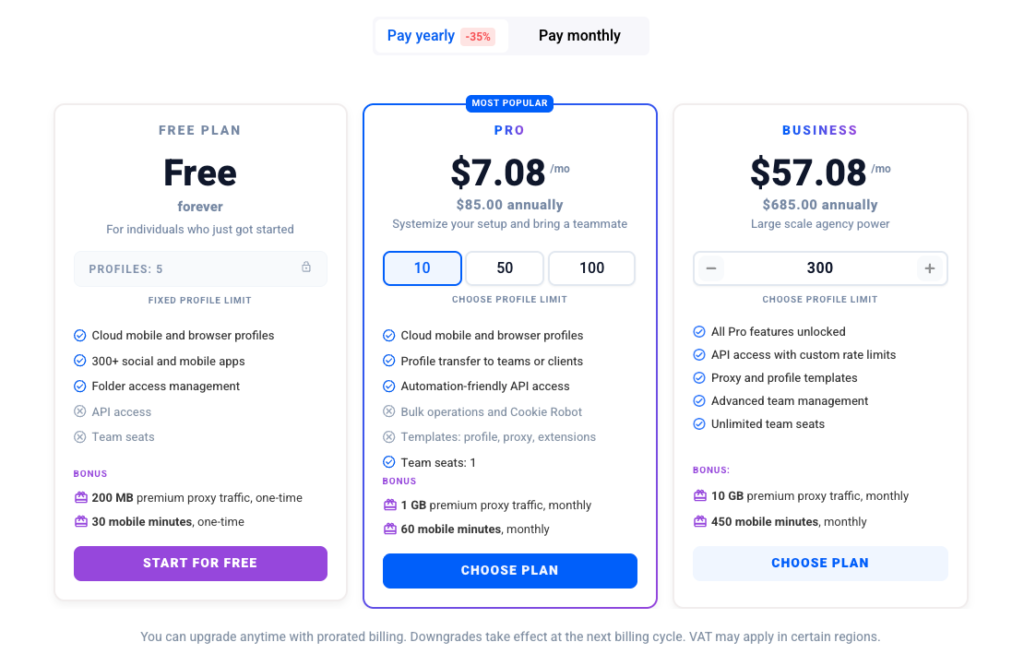
BitBrowser offers 10 permanent free browser profiles, which is rare in this category. Paid tiers start around $10 per month for roughly 50 profiles. For beginners, freelancers, or anyone testing anti-detect workflows, this is the lowest barrier to entry.
AdsPower uses tiered pricing that scales with profile count and team size. It offers a free trial, and paid plans are mid-range for the category. Larger teams should expect costs to rise as profile counts grow, but the automation and collaboration features often justify the price for agencies.
Multilogin is the most expensive of the three, with no permanent free plan beyond a trial. The higher price reflects built-in proxies, native Android profiles, and enterprise support. For small operators, the cost can be hard to justify. For teams where a single account ban costs more than a monthly subscription, it is often the most economical choice in the long run.
Team Collaboration and Security
AdsPower offers role-based permissions, activity logs, and collaboration dashboards. It holds SOC 2 Type II, ISO 27001, and ISO 27701 certifications, which matters for agencies that need to demonstrate compliance to clients.
Multilogin provides enterprise-level collaboration with role-based access, advanced logs, and unlimited seats. Its 24/7 multilingual support is a differentiator for teams operating across time zones.
BitBrowser includes basic team collaboration with permission management and data synchronization. It is sufficient for small teams but lacks the depth of the other two for large, distributed operations.
Decision Guide: Which Should You Choose?
Choose BitBrowser if:
- You are a beginner or freelancer with a tight budget.
- You need a free tier to test multi-account workflows.
- Your operation is small-scale and does not involve high-risk platforms.
Choose AdsPower if:
- You run an agency or team that needs role-based permissions and activity logs.
- Automation is central to your workflow, especially no-code RPA.
- You want strong fingerprint control without Multilogin's price tag.
- You value compliance certifications like SOC 2 Type II and ISO 27001.
Choose Multilogin if:
- Your accounts are high-value and a ban would be costly.
- You need native Android cloud phones rather than emulation.
- You want built-in residential proxies to avoid third-party proxy management.
- You operate at enterprise scale and need 24/7 support.
For a broader comparison of AdsPower against other tools in the category, see this AdsPower vs Undetectable vs Kameleo breakdown.
Related reading
- 2Captcha Review 2026: Pricing, Accuracy, and API Deep Dive - In-depth 2Captcha review covering pricing, accuracy, API setup, supported captcha types, and whether it's worth using for developers and workers in 2026.
Sources and further reading
- BitBrowser vs AdsPower– Full 2026 Comparison - Multilogin - Learn the differences between Kameleo and MoreLogin antidetect browsers in 2026 — features, pricing, pros and cons.
- Top 10 Anti‑Detect Browsers to Watch in 2026 - Discover the top 10 anti‑detect browsers in 2026. Compare features, pricing, fingerprint accuracy, and team collaboration tools to find the best browser for multi‑account operations and online privacy.
- Best Antidetect Browser 2026: AdsPower vs Multilogin vs Incogniton - Try AdsPower and run multiple accounts without bans:https://share.adspower.net/saasreport ^ Don't forget to use our referral code: SAASREPORT for additional ...
Frequently Asked Questions
Is BitBrowser safe for multi-accounting?
BitBrowser is adequate for small projects and low-risk platforms. Its fingerprint engine is less advanced than Multilogin or AdsPower, so it carries more risk at scale or on platforms with aggressive detection. Pairing it with high-quality proxies reduces but does not eliminate that risk.
Does AdsPower include built-in proxies?
No. AdsPower supports all major proxy protocols and includes a proxy manager, but you must source proxies from an external provider. Multilogin is the only one of the three with built-in residential proxies.
Can Multilogin run mobile profiles?
Yes. Multilogin offers native Android cloud phones with real device parameters, which is more realistic than the partial emulation offered by AdsPower or the separate BitCloudPhone service from BitBrowser.
Which browser is best for automation?
AdsPower has the strongest automation story for most users, thanks to its no-code RPA and Local API integration with Selenium and Puppeteer. Multilogin supports the same developer frameworks but lacks a comparable no-code layer. BitBrowser's automation is more limited.
Is there a free anti-detect browser among these three?
BitBrowser offers 10 permanent free profiles, making it the only one with a lasting free tier. AdsPower offers a free trial, and Multilogin offers a trial only.
Conclusion
AdsPower, Multilogin, and BitBrowser each serve a distinct segment of the anti-detect browser market. BitBrowser wins on price and accessibility, making it a sensible starting point for beginners. AdsPower wins on automation, team features, and compliance, making it the strongest all-rounder for agencies and growing teams. Multilogin wins on stealth depth, native mobile profiles, and built-in proxies, making it the choice for high-stakes operations where bans are expensive.
The best approach is to match the tool to your risk level, account volume, and workflow. If you are just testing the waters, start with BitBrowser's free tier. If you are scaling a team operation with automation, AdsPower is the pragmatic middle ground. If your accounts are too valuable to lose, Multilogin's premium is an investment in stability rather than an expense.