
Playwright CAPTCHA: Bypass, Solve, and Test in 2026
Take a Quick Look
Learn how Playwright handles CAPTCHA in 2026, which solver libraries work, why bypassing fails, and the safer testing and automation alternatives.
🔥 Limited-Time Offer! Save extra 10% off on your first monthly plan with code: Anitdetect10
Sign upPlaywright CAPTCHA: What Works, What Fails, and How to Test Smarter in 2026
CAPTCHA is one of the most frustrating obstacles for Playwright automation. A test suite that runs perfectly locally can stall in CI, a scraper can suddenly hit a Cloudflare Turnstile wall, and a login flow can break without any visible error. The reason is simple: CAPTCHA systems are designed to detect and stop automation, and Playwright behaves like automation by default.
This guide explains how CAPTCHA detection actually works, which Playwright CAPTCHA solver libraries exist, why direct bypass attempts usually fail in production, and what safer alternatives you should consider for testing, scraping, and multi-account workflows.
What Is CAPTCHA and Why It Blocks Playwright
Playwright CAPTCHA: Bypass, Solve, and Test in 2026 - What Is CAPTCHA and Why It Blocks Playwright.
CAPTCHA stands for Completely Automated Public Turing test to tell Computers and Humans Apart. Websites deploy it to protect high-risk actions such as account registration, login, password reset, checkout, and form submission from bots that brute-force credentials, scrape data, or create fake accounts at scale.
Early CAPTCHAs showed distorted text or image grids. Modern systems are far more sophisticated. Instead of always showing a puzzle, they evaluate risk continuously in the background. They collect browser fingerprint data, interaction timing, execution environment signals, and network reputation before deciding whether to show a challenge at all.
Playwright tests trigger these systems because they share the same characteristics CAPTCHA systems are trained to flag:
- Headless or controlled browser execution
- Identical interaction patterns across runs
- Faster-than-human action timing
- Cloud or datacenter IP ranges associated with automation
- Default browser configurations without fingerprint variability
This is why CAPTCHA failures are systemic, not incidental. The challenge is not reacting to a single UI element; it is responding to the entire execution context.
How Modern CAPTCHA Detection Works
Playwright CAPTCHA: Bypass, Solve, and Test in 2026 - How Modern CAPTCHA Detection Works.
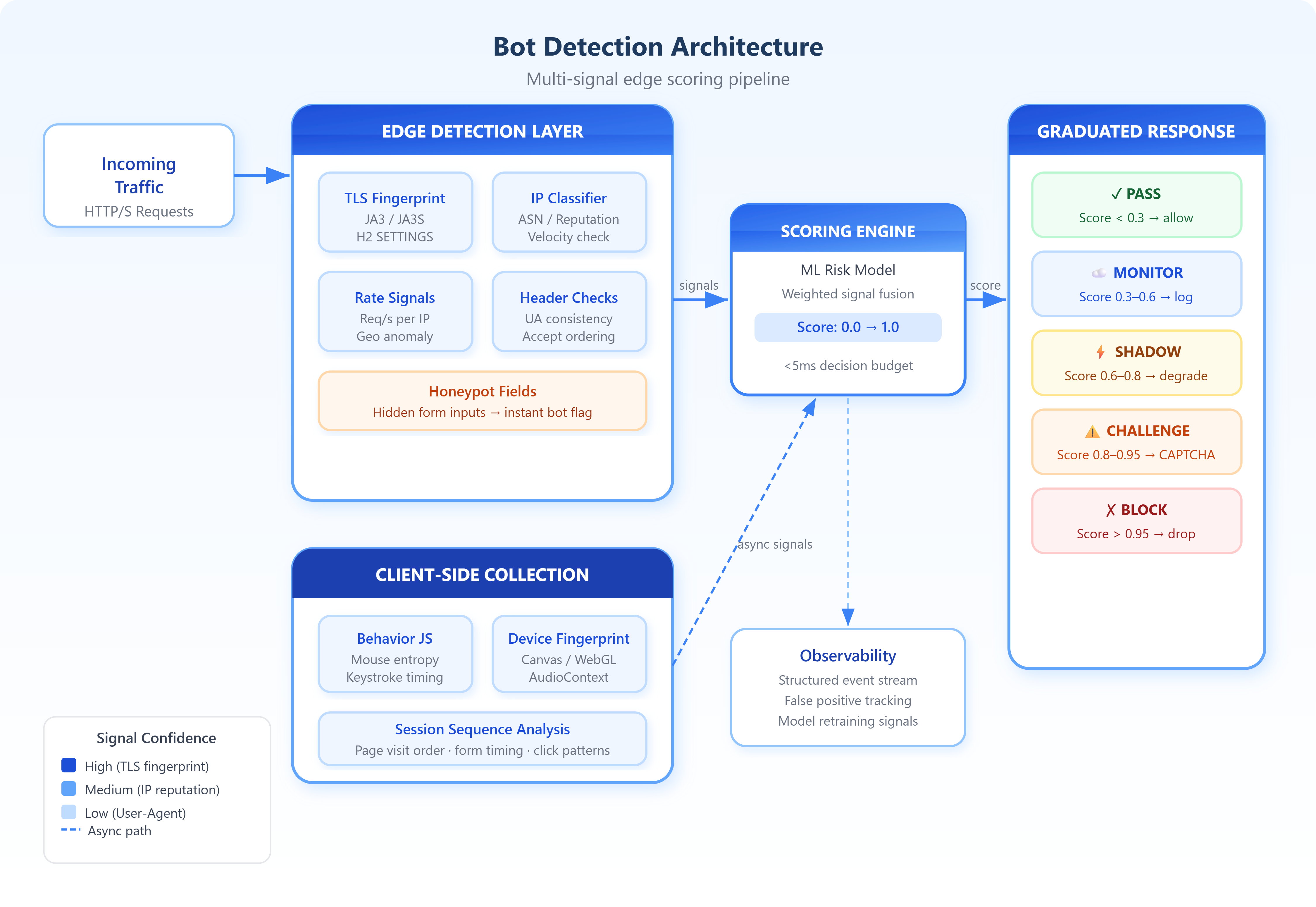
Modern CAPTCHA systems operate in layers. The most important insight for Playwright users is that detection usually happens before any visible challenge appears.
Browser Fingerprint Signals
CAPTCHA providers evaluate whether the browser environment looks authentic. They check:
- Canvas and WebGL rendering output
- Font availability and rendering
- User agent consistency
- Screen resolution, viewport size, and timezone
- Presence of automation APIs and hooks
Behavioral Signals
Interaction data is collected as the user navigates. CAPTCHA systems analyze:
- Mouse movement cadence and trajectory
- Scrolling behavior and focus changes
- Keystroke intervals
- Time spent on page elements
Network and Environment Signals
Server-side risk models also consider:
- IP reputation and ASN classification
- Proxy or VPN usage
- Request frequency and parallelism
- Cookie and session history
Each signal contributes to a risk score. If the score stays below a threshold, the user sees no CAPTCHA. If it exceeds the threshold, a challenge appears or requests are blocked. Playwright cannot control most of these signals, which is why script-level workarounds are fragile.
Types of CAPTCHAs You Will Encounter

Playwright CAPTCHA: Bypass, Solve, and Test in 2026 - Types of CAPTCHAs You Will Encounter.
Understanding which CAPTCHA type you are dealing with determines your strategy.
reCAPTCHA v2
The classic checkbox or image-selection challenge. While familiar, it is backed by behavior analysis and is rarely as simple as clicking a box. The checkbox often triggers invisible risk scoring before the visible puzzle appears.
reCAPTCHA v3
A score-based system that never shows a challenge by default. It assigns a risk score from 0.0 to 1.0 based on observed behavior. Low scores result in blocked actions or fallback challenges. This is especially disruptive for automation because failures occur without visible cues.
Cloudflare Turnstile and Interstitial
Cloudflare's CAPTCHA alternatives are increasingly common. Turnstile is an invisible challenge that runs automatically, while Interstitial presents a managed challenge page. Both are heavily integrated with Cloudflare's broader bot management, making them difficult to bypass from a single browser context.
hCaptcha and Other Puzzle-Based Systems
hCaptcha uses image classification tasks and is often used as a privacy-focused alternative to reCAPTCHA. Other systems like FunCaptcha, Geetest, and DataDome use puzzles, sliders, or behavioral analysis.
Can Playwright Truly Bypass CAPTCHA in 2026?
Playwright CAPTCHA: Bypass, Solve, and Test in 2026 - Can Playwright Truly Bypass CAPTCHA in 2026?.
The short answer is no. Playwright cannot reliably bypass CAPTCHA in a way that is stable, scalable, and compliant. CAPTCHA systems are engineered to detect automation across browser behavior, execution environment, and network signals, many of which sit outside Playwright's control.
Any technique that appears to work is usually exploiting a temporary detection gap rather than addressing the underlying mechanism. Detection logic evolves continuously, which means bypass workarounds have a short lifespan. Techniques that pass locally tend to fail in CI and parallel runs.
Common bypass approaches and their limitations include:
- Running in headed mode: Helps avoid basic headless checks but does not address fingerprint or network signals.
- User-agent and viewport overrides: Easy to implement but trivial for modern detection systems to spot.
- Stealth scripts: Can hide some automation APIs but often introduce new inconsistencies.
- Cookie or session reuse: Works until the session expires or the risk score degrades.
- Third-party solver APIs: Can solve visible challenges but do not prevent detection before the challenge appears.
Playwright CAPTCHA Solver Libraries
Several open-source libraries attempt to automate CAPTCHA solving with Playwright. They fall into two categories: click-based solvers and API-based solvers.
playwright-captcha
The playwright-captcha Python package supports Cloudflare Turnstile, Cloudflare Interstitial, reCAPTCHA v2, and reCAPTCHA v3. It offers two solving modes:
- Click Solver: Uses the browser's stealthiness to automatically click and solve challenges. It works best with stealth-patched Playwright variants like Camoufox or Patchright.
- API Solver: Sends CAPTCHA data to external services like 2Captcha or TenCaptcha, then applies the returned solution.
The library is designed for easy integration with Playwright, Patchright, and Camoufox. A basic Click Solver example looks like this:
import asyncio
from playwright.async_api import async_playwright
from playwright_captcha import CaptchaType, ClickSolver, FrameworkType

async def solve_captcha():
    async with async_playwright() as playwright:
        browser = await playwright.chromium.launch(headless=True)
        page = await browser.new_page()
        framework = FrameworkType.PLAYWRIGHT

        async with ClickSolver(framework=framework, page=page) as solver:
            await page.goto('https://example.com/with-captcha')
            await solver.solve_captcha(
                captcha_container=page,
                captcha_type=CaptchaType.CLOUDFLARE_TURNSTILE
            )

asyncio.run(solve_captcha())
Playwright-reCAPTCHA
The Playwright-reCAPTCHA library focuses specifically on reCAPTCHA v2 and v3. For v2, it can solve the audio challenge by transcribing it with Google's speech recognition API, or solve the image challenge using the CapSolver API. For v3, it waits for the browser to make the reload POST request and parses the g-recaptcha-response token.
A basic reCAPTCHA v2 example:
from playwright.sync_api import sync_playwright
from playwright_recaptcha import recaptchav2

with sync_playwright() as playwright:
    browser = playwright.firefox.launch()
    page = browser.new_page()
    page.goto("https://www.google.com/recaptcha/api2/demo")

    with recaptchav2.SyncSolver(page) as solver:
        token = solver.solve_recaptcha(wait=True)
        print(token)
Limitations of Solver Libraries
These libraries can solve visible challenges, but they do not address the underlying detection problem. If a CAPTCHA system flags the browser environment before a challenge appears, no solver can help. Solver libraries also introduce external dependencies, API costs, and legal considerations. They are best suited for controlled testing environments where you have permission to interact with the target site.
Safer Alternatives to CAPTCHA Bypass
For most teams, the most reliable strategy is to avoid triggering CAPTCHA in the first place.
1. Disable CAPTCHA in Test Environments
The most effective approach for application testing is to work with your development team to disable CAPTCHA in staging or test environments. Many CAPTCHA providers offer test keys or allowlisted domains that bypass challenges entirely. This keeps your Playwright tests focused on application logic rather than security controls.
2. Use Allowlisted Test Keys
reCAPTCHA and hCaptcha provide test keys that always pass or always fail. These are designed specifically for automated testing and eliminate flakiness without requiring bypass techniques.
3. Design Test Flows That Avoid CAPTCHA Triggers
If disabling CAPTCHA is not possible, structure your tests to minimize detection risk:
- Run tests in headed mode when possible
- Add realistic delays and human-like interaction patterns
- Vary user agents, viewports, and timezones across test runs
- Avoid running high volumes of parallel tests from the same IP
- Reuse authenticated sessions where appropriate
4. Use an Anti-Detect Browser for Multi-Account Workflows
When your goal is managing multiple accounts on platforms that aggressively deploy CAPTCHA, a dedicated anti-detect browser can reduce challenge frequency. AdsPower creates isolated browser profiles with unique digital fingerprints, including Canvas, WebGL, user agent, and other parameters. This makes each profile appear as a distinct, legitimate browser environment rather than an automated one.
For teams combining Playwright automation with multi-account management, AdsPower offers a Local API that integrates with Selenium and Puppeteer, and supports proxy configuration to mask IP addresses. This approach does not bypass CAPTCHA directly, but it reduces the risk signals that trigger challenges in the first place. Learn more about combining AdsPower with CAPTCHA solving services in the AdsPower and Anti Captcha setup guide.
5. Use Playwright's Built-In Authentication Features
For login flows, Playwright's storageState and API authentication features can help you avoid CAPTCHA entirely. By authenticating once manually or through an API, you can reuse the session across tests without repeatedly triggering login challenges.
Legal and Ethical Considerations
Bypassing CAPTCHA raises significant legal and ethical concerns. CAPTCHA systems are explicitly designed as security controls, and circumventing them can violate:
- Terms of service agreements
- The Computer Fraud and Abuse Act (CFAA) in the United States
- Various cybersecurity laws in other jurisdictions
- Compliance requirements in regulated industries
Most solver libraries include disclaimers stating they are for educational and research purposes only. Using them against websites without explicit permission can expose you to legal liability. For production automation, always work within the target site's terms of service and use official APIs when available.
Choosing the Right Approach
| Scenario | Recommended Approach |
|---|---|
| Testing your own application | Disable CAPTCHA in test environments or use allowlisted test keys |
| Scraping public data | Use official APIs first; if scraping is necessary, minimize request frequency and use residential proxies |
| Multi-account management | Use an anti-detect browser like AdsPower with isolated profiles and proxies |
| Automating a third-party site you have permission to access | Use solver libraries in controlled environments with explicit authorization |
| Automating a third-party site without permission | Not recommended; high legal and technical risk |
Related reading
- AdsPower vs Undetectable vs Kameleo: Which Wins in 2026? - Compare AdsPower, Undetectable, and Kameleo across fingerprinting, automation, pricing, and team features to pick the right anti-detect browser.
- How to Use AdsPower with Ticketmaster: Setup & Workflow - Learn how to combine AdsPower anti-detect browser with Ticketmaster for stable logins, queue access, and multi-account ticket workflows.
Sources and further reading
- Bypassing CAPTCHA with Playwright in 2026 | BrowserStack - Learn what CAPTCHA bypass means in Playwright, practical limitations, legal risks, and safer testing alternatives in 2026.
Frequently Asked Questions
Can Playwright bypass CAPTCHA automatically?
No. Playwright cannot reliably bypass CAPTCHA on its own. CAPTCHA systems detect automation through browser fingerprints, behavior patterns, and network signals that Playwright cannot fully control. Any bypass that works today is likely to fail as detection systems evolve.
What is the best Playwright CAPTCHA solver?
The best solver depends on your use case. The playwright-captcha Python package supports Cloudflare Turnstile, Cloudflare Interstitial, reCAPTCHA v2, and reCAPTCHA v3 with both click-based and API-based solving. The playwright-recaptcha library focuses specifically on reCAPTCHA v2 and v3. Both require careful setup and work best in controlled environments.
How do I handle reCAPTCHA v3 in Playwright?
reCAPTCHA v3 is score-based and never shows a visible challenge. The playwright-recaptcha library captures the g-recaptcha-response token by listening for the reload POST request. However, if the risk score is too low, the token may be rejected server-side. The most reliable approach is to use allowlisted test keys in development.
Does using a stealth browser help with CAPTCHA?
Stealth browsers like Camoufox or Patchright can reduce detection signals by hiding automation APIs and adding human-like behavior. However, they do not guarantee CAPTCHA bypass. They are most effective when combined with other risk-reduction strategies such as residential proxies and realistic interaction patterns.
Is CAPTCHA bypass legal?
Bypassing CAPTCHA without permission is generally not legal and violates most websites' terms of service. It can also violate laws like the CFAA in the United States. Always obtain explicit permission before attempting to automate interactions with a third-party website.
Conclusion
Playwright CAPTCHA handling in 2026 is less about bypassing and more about avoiding. CAPTCHA systems have evolved to detect automation at the browser, behavior, and network levels, making direct bypass attempts fragile and legally risky. Solver libraries like playwright-captcha and playwright-recaptcha can solve visible challenges in controlled environments, but they do not address the underlying detection problem.
The most reliable strategies are to disable CAPTCHA in test environments, use allowlisted test keys, structure automation to minimize risk signals, and use anti-detect browsers like AdsPower when managing multiple accounts on CAPTCHA-protected platforms. By working with CAPTCHA systems rather than against them, you can build automation that is stable, scalable, and compliant.