
AdsPower vs Linken Sphere vs RoxyBrowser: 2026 Test
Take a Quick Look
Compare AdsPower, Linken Sphere, and RoxyBrowser on fingerprinting, automation, team features, and pricing. Find the right anti-detect browser for your workflow.
🔥 Limited-Time Offer! Save extra 10% off on your first monthly plan with code: Anitdetect10
Sign upAdsPower vs Linken Sphere vs RoxyBrowser: Which Anti-Detect Browser Fits Your Workflow in 2026?
Choosing an anti-detect browser is rarely a one-size-fits-all decision. A solo affiliate running a handful of Facebook accounts has different needs than an agency managing hundreds of client profiles across Amazon, TikTok, and Google. AdsPower, Linken Sphere, and RoxyBrowser all promise isolated browser fingerprints and ban-free multi-account management, but they approach the problem from different angles.
This comparison breaks down how the three tools differ on fingerprint control, automation, team collaboration, proxy integration, and pricing, so you can match the right browser to the way you actually work.
How We Evaluated the Three Browsers
Every anti-detect browser claims to keep your accounts safe. To cut through the marketing, we looked at the criteria that matter most in daily operation:
- Fingerprint depth and control: How many parameters can you customize, and how realistic are the generated identities?
- Automation capability: Does the tool support scripting, API access, or no-code workflows?
- Team features: Can you share profiles, assign roles, and sync data across devices without breaking isolation?
- Proxy handling: How easy is it to attach, rotate, and manage proxies per profile?
- Pricing and scalability: What does the free tier include, and how do costs grow as your profile count climbs?
- Stability and support: How quickly are browser kernel updates shipped, and what happens when something breaks?
Quick Comparison Table

Linken Sphere product interface.
| Criterion | AdsPower | Linken Sphere | RoxyBrowser |
|---|---|---|---|
| Free plan | 2 profiles forever | No permanent free tier (trial-based) | 5 profiles free |
| Starting paid price | From $9/month | From $30/month | Usage-based, from roughly $0.03–$0.80 per profile |
| Browser kernels | Chromium + Firefox | Chromium-based | Chromium-based |
| Fingerprint parameters | 20+ | Extensive, engine-level | Advanced isolation |
| Automation | No-code RPA, Local API, window sync | Automation designed to avoid bot detection | Puppeteer, Selenium, Playwright support |
| Team collaboration | Role-based permissions, encrypted sync | Granular access controls | Workspaces |
| Best suited for | E-commerce sellers, social media marketers, agencies | Advertising, crypto, marketplace professionals | SEO, scraping, ad verification, affiliate teams |
AdsPower: Built for Scale and Team Workflows
AdsPower positions itself as a general-purpose anti-detect browser for professionals who need to run many accounts without friction. Its core strength is the breadth of the ecosystem: dual Chromium and Firefox kernels, mobile OS emulation, and a fingerprint engine that simulates more than 20 parameters including Canvas, WebGL, Audio, and WebRTC.
Where AdsPower Excels
Fingerprint flexibility. AdsPower lets you customize fingerprints at a granular level or generate fresh identities automatically. The dual-kernel support matters in practice: some platforms behave differently on Firefox, and having that option reduces the chance of a fingerprint pattern standing out across a large profile fleet.
Automation without a developer. The no-code RPA robots and window synchronization features let a marketing team automate repetitive posting, data entry, or scraping tasks without writing scripts. For technical teams, the Local API opens the same capabilities programmatically. This dual approach is rare among anti-detect browsers and makes AdsPower accessible to both non-technical operators and developers.
Team infrastructure. Role-based permissions, encrypted data storage, and cross-device sync are designed for agencies and distributed teams. You can grant a VA access to five profiles without exposing the rest of your operation, and changes sync across devices without breaking profile isolation.
Free tier and entry pricing. The free forever plan with 2 profiles is genuinely useful for testing the platform, and paid plans starting at $9/month keep the entry barrier low compared to many competitors.
For a deeper look at how AdsPower stacks up against other tools in this category, see our AdsPower vs Kameleo vs MuLogin comparison.
Where AdsPower Requires Trade-offs
AdsPower's interface can feel dense for newcomers, and some users report that browser kernel updates occasionally lag behind the latest Chromium releases. If your workflow is simple and you only need a handful of profiles, the feature set may be more than you need.
Linken Sphere: Security-First for High-Stakes Accounts

Linken Sphere product interface.
Linken Sphere has been on the market since 2017 and built its reputation among advertising, cryptocurrency, and marketplace professionals. Its pitch is narrower than AdsPower's: complete profile isolation, engine-level fingerprint integrity, and automation that does not trip bot detection systems.
Where Linken Sphere Excels
Profile isolation depth. Linken Sphere ensures cookies, cache, sessions, and fingerprints never cross between profiles. For operators managing high-value accounts, such as crypto exchange logins or funded ad accounts, this isolation is the primary defense against chain bans and financial fraud.
Automation reliability. The automation layer is built to mimic human behavior closely enough to avoid triggering bot detection on strict platforms. For affiliate marketers and arbitrage teams running paid traffic, this reliability can be the difference between a profitable campaign and a banned account.
Team access controls. Granular permissions let you share specific profiles with team members without exposing credentials or session data. This is useful for agencies that outsource parts of their operation to contractors.
Where Linken Sphere Requires Trade-offs
Linken Sphere's pricing starts around $30/month, which is significantly higher than AdsPower's entry point. There is no permanent free tier, and the feature set is optimized for a specific type of user: someone running high-stakes accounts who prioritizes isolation and stealth over broad workflow automation. If you need no-code RPA or Firefox kernel support, Linken Sphere is not designed for those use cases.
RoxyBrowser: Lightweight and Proxy-Native
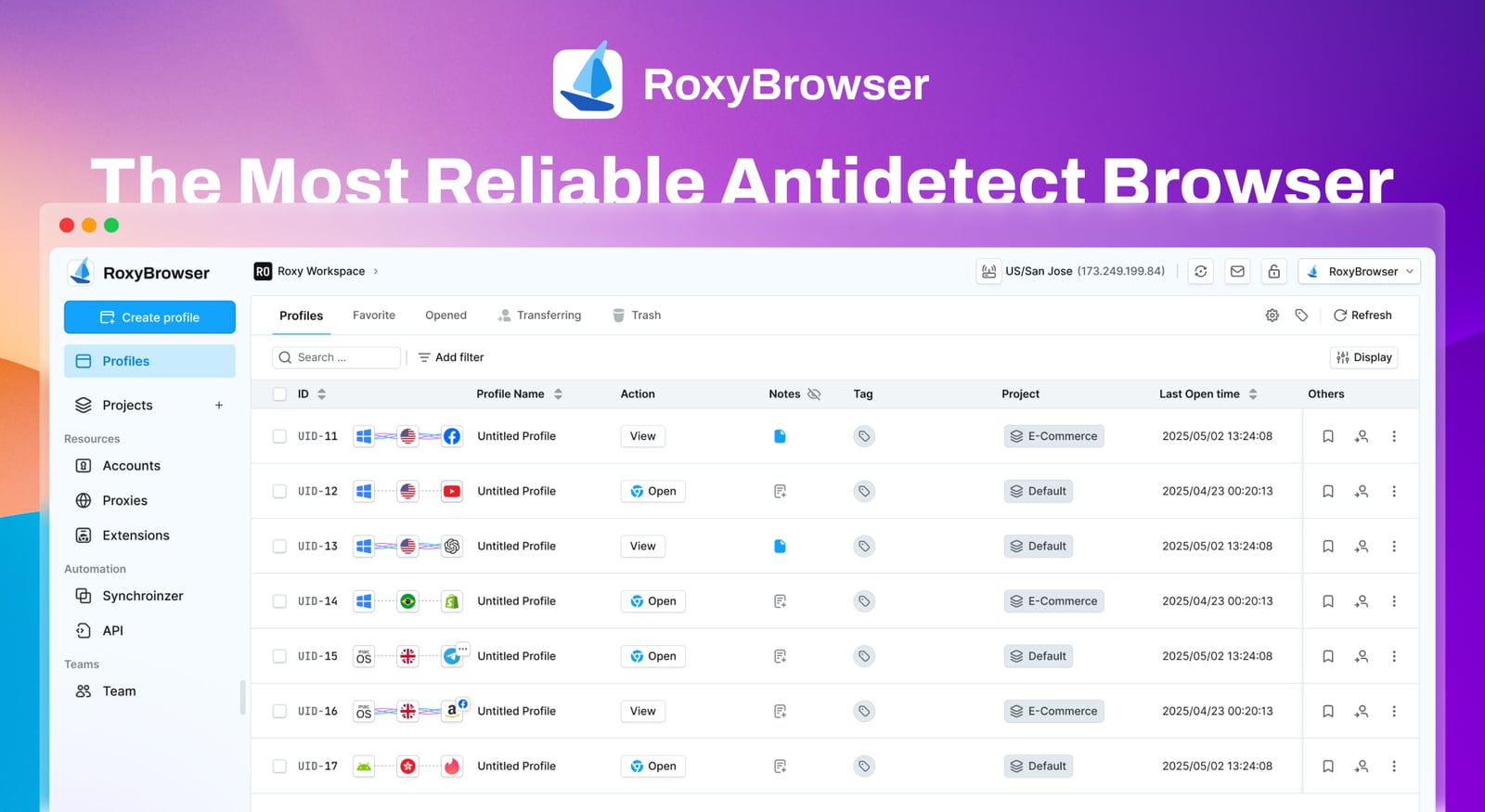
RoxyBrowser product interface.
RoxyBrowser is the youngest of the three tools and takes a different approach. It is built around the RoxyIP proxy infrastructure, which means proxy integration is not an afterthought but a core part of the product. The browser is lightweight, supports Windows and macOS, and offers a 7-day free trial with scalable pricing that starts at free.
Where RoxyBrowser Excels
Proxy-native architecture. Because RoxyBrowser is tightly integrated with RoxyIP, attaching residential or mobile proxies to profiles is streamlined. For teams doing SERP analysis, ad verification, or geo-restricted content testing, this tight coupling saves setup time and reduces configuration errors.
Developer-friendly automation. Native support for Puppeteer, Selenium, and Playwright makes RoxyBrowser a strong choice for technical teams that already have automation scripts and want to run them inside isolated browser environments. This is a meaningful advantage over tools that require proprietary APIs.
Cost flexibility. The usage-based pricing model, roughly $0.03 to $0.80 per profile depending on volume, can be economical for teams that spin profiles up and down frequently rather than maintaining a large always-on fleet.
Where RoxyBrowser Requires Trade-offs
RoxyBrowser's feature set is narrower than AdsPower's. It lacks a Firefox kernel, no-code RPA tools, and the depth of team collaboration features that AdsPower offers. The free plan includes 5 profiles, which is generous, but teams that need window synchronization or built-in RPA will need to look elsewhere or supplement with external tools.
Head-to-Head: Which Browser Wins on Each Criterion

RoxyBrowser product interface.
Fingerprint Control
All three browsers generate isolated fingerprints, but the depth of control varies. AdsPower offers 20+ customizable parameters across two browser kernels, giving you flexibility when a platform's detection system targets a specific signal. Linken Sphere focuses on engine-level integrity, which can be more resistant to deep fingerprinting checks but offers less manual customization. RoxyBrowser provides advanced fingerprint isolation but is optimized for proxy-aligned identities rather than granular manual tuning.
Winner for flexibility: AdsPower. Winner for stealth depth: Linken Sphere.
Automation
This is where the three tools diverge most sharply. AdsPower offers both no-code RPA and a Local API, covering non-technical and technical users. RoxyBrowser is built for developers who already work with Puppeteer, Selenium, or Playwright. Linken Sphere's automation is designed specifically to avoid bot detection, which is valuable for paid traffic campaigns but less flexible for general workflow automation.
Winner for accessibility: AdsPower. Winner for developer integration: RoxyBrowser. Winner for stealth automation: Linken Sphere.
Team Collaboration
AdsPower's role-based permissions, encrypted storage, and cross-device sync are the most complete team infrastructure of the three. Linken Sphere offers granular access controls but is more focused on secure profile sharing than full team workflow management. RoxyBrowser's Workspaces provide basic collaboration but are less mature than AdsPower's offering.
Winner: AdsPower.
Proxy Integration
RoxyBrowser's native RoxyIP integration is a genuine advantage for users who need residential or mobile proxies baked into their workflow. AdsPower supports all major proxy types and offers per-profile proxy management, but requires manual configuration. Linken Sphere also supports proxy integration but does not bundle a proxy network.
Winner for proxy-native workflows: RoxyBrowser. Winner for proxy flexibility: AdsPower.
Pricing and Scalability
AdsPower's free 2-profile plan and $9/month entry point make it the most accessible for beginners and small teams. RoxyBrowser's free 5-profile tier and usage-based pricing can be cheaper for low-volume or intermittent use. Linken Sphere's $30+ starting price reflects its focus on high-stakes professional use, but it is the most expensive entry point of the three.
Winner for budget entry: AdsPower. Winner for intermittent use: RoxyBrowser.
Which Browser Should You Choose?
Choose AdsPower if...
- You manage e-commerce seller accounts, social media profiles, or agency client work at scale.
- You need both no-code automation and API access in one tool.
- Your team needs role-based permissions and cross-device sync.
- You want a low-cost entry point with a free forever plan.
Choose Linken Sphere if...
- You run high-stakes crypto, advertising, or marketplace accounts where isolation failures are catastrophic.
- Your automation must pass strict bot detection on paid traffic platforms.
- You are willing to pay a premium for engine-level fingerprint integrity.
Choose RoxyBrowser if...
- Your workflow is built around residential or mobile proxies and you want them natively integrated.
- You already have Puppeteer, Selenium, or Playwright scripts and need isolated browser environments to run them.
- You need a lightweight tool for SERP analysis, ad verification, or geo-testing rather than full multi-account management.
Practical Example: Running 50 TikTok Accounts
Imagine you are a social media marketer managing 50 TikTok accounts for clients. Here is how the decision might play out:
With AdsPower, you would create 50 isolated profiles with unique fingerprints, assign proxies per profile, and use window synchronization to post the same content across multiple accounts simultaneously. Team members could be granted access to specific client profiles without seeing others. The no-code RPA could automate daily posting routines.
With Linken Sphere, you would get strong isolation for each account, but you would pay more and lose the no-code automation and window synchronization features. This might be the right call if the accounts are high-value and you have a technical team to handle automation separately.
With RoxyBrowser, you would benefit from native proxy integration and could run your existing Playwright scripts inside isolated profiles. However, you would need to build your own posting workflow since there is no built-in window synchronization or no-code RPA.
For a step-by-step guide on using an anti-detect browser with TikTok specifically, see our AdsPower TikTok for Business setup guide.
Related reading
- PacketStream Review 2026: $1/GB Residential Proxies Tested - In-depth PacketStream review: we test the $1/GB residential proxy network for web scraping, ad verification, and multi-accounting. See real performance, pricing, and setup.
Sources and further reading
- 9 Best RoxyBrowser Alternatives in 2026 - Multilogin - Looking for RoxyBrowser alternatives? Explore the 9 best RoxyBrowser alternatives in 2026 for multi-accounting
- GitHub - TheGP/untidetect-tools: List of anti-detect and humanizing tools and browsers, including captcha solvers and sms-activation. - List of anti-detect and humanizing tools and browsers, including captcha solvers and sms-activation. - TheGP/untidetect-tools
- Top 12 Antidetect Browsers with Proxy Connection in 2026 - Antidetect browsers are specialized browsers that allow users to connect anonymously by hiding their fingerprint and using proxies. Which browser to choose?
Frequently Asked Questions
Is AdsPower better than Linken Sphere?
It depends on your use case. AdsPower is better for teams that need broad workflow automation, flexible pricing, and dual-kernel fingerprint control. Linken Sphere is better for high-stakes accounts where isolation depth and stealth automation are the top priorities, but it costs more and offers fewer general workflow features.
Is RoxyBrowser a good alternative to AdsPower?
RoxyBrowser is a strong alternative for technical teams that already use Puppeteer, Selenium, or Playwright and want native proxy integration. However, it lacks AdsPower's no-code RPA, Firefox kernel, and depth of team collaboration features. If those matter to you, RoxyBrowser may feel limited.
Which anti-detect browser is cheapest?
AdsPower has the lowest entry point with a free 2-profile plan and paid plans from $9/month. RoxyBrowser offers 5 free profiles and usage-based pricing that can be cheaper for intermittent use. Linken Sphere is the most expensive, starting around $30/month with no permanent free tier.
Can I use all three browsers together?
Yes. Some teams use different browsers for different workflows, for example, AdsPower for client social media management and RoxyBrowser for scraping or ad verification. Just be aware that managing multiple tools adds overhead, and you should never mix profiles from different browsers in the same campaign without careful proxy and fingerprint planning.
Do anti-detect browsers guarantee no bans?
No browser can guarantee zero bans. Platform detection systems evolve constantly, and factors like proxy quality, account behavior, and content compliance also affect ban risk. An anti-detect browser reduces the risk of fingerprint-based linking, but it is one part of a broader account management strategy. For more on protecting your accounts, see our guide on temporary phone numbers for SMS verification.
Conclusion
AdsPower, Linken Sphere, and RoxyBrowser each serve a distinct segment of the multi-account management market. AdsPower is the most versatile option, combining broad fingerprint control, accessible automation, and team infrastructure at a competitive price. Linken Sphere is a specialized tool for high-stakes operators who prioritize isolation depth and stealth automation above all else. RoxyBrowser is a lightweight, proxy-native option for technical teams that already have automation scripts and need isolated environments to run them.
The right choice depends on what you are protecting, how you automate, and how your team is structured. If you are still comparing options, our AdsPower vs BitBrowser comparison covers another popular alternative with a different feature set.