
AdsPower vs GoLogin 2026: Which Anti-Detect Browser Wins?
Take a Quick Look
Compare AdsPower vs GoLogin on fingerprinting, automation, team controls, pricing, and scalability to find the right anti-detect browser for multi-account work.
🔥 Limited-Time Offer! Save extra 10% off on your first monthly plan with code: Anitdetect10
Sign upAdsPower vs GoLogin: Which Anti-Detect Browser Wins in 2026?
Managing multiple online accounts without triggering platform bans has become harder than ever. Platforms like Facebook, Amazon, Google, and TikTok now track browser fingerprints, device signals, and behavior patterns to link accounts and block suspicious activity. Anti-detect browsers solve this by creating isolated browser profiles with unique digital fingerprints, letting you operate dozens or hundreds of accounts as if each one belonged to a different person.
AdsPower and GoLogin are two of the most recognized names in this space. Both promise safer multi-account management, but they diverge sharply in automation depth, fingerprint control, team permissions, and long-term value. This comparison breaks down the differences that matter for real workflows, so you can choose the tool that fits your scale and use case.
What Are Anti-Detect Browsers and Why Do They Matter?
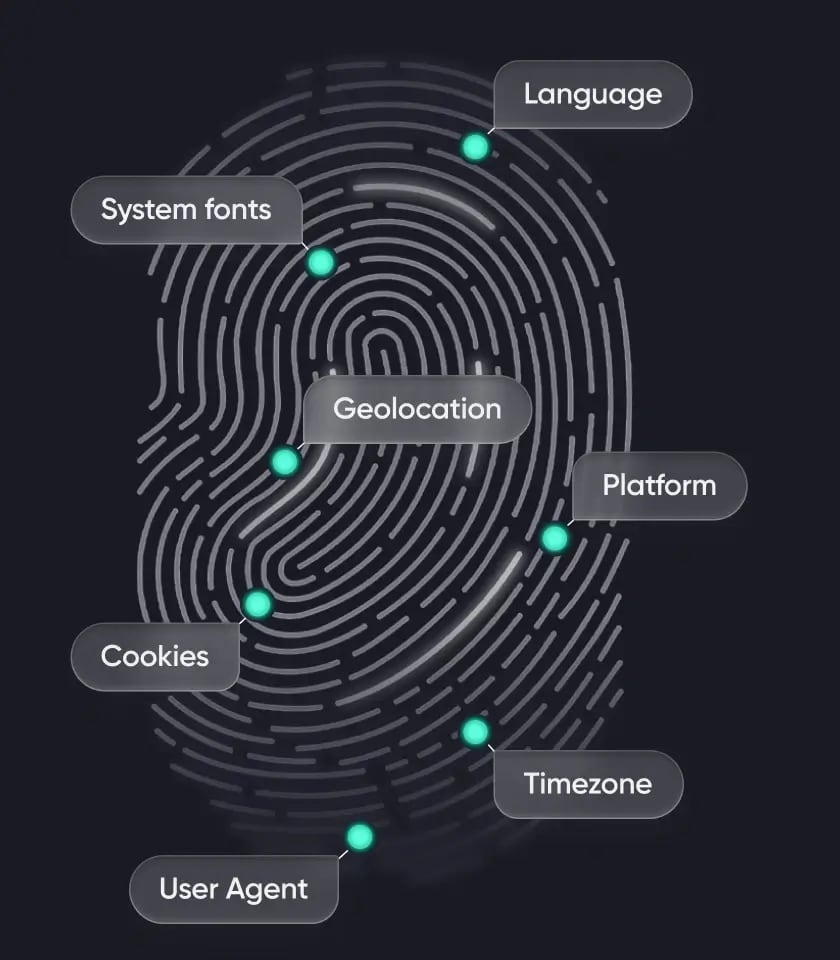
When you visit a website, your browser exposes a wide range of technical details: browser type and version, operating system, installed fonts, screen resolution, time zone, language settings, Canvas and WebGL rendering, and more. Combined, these signals form a browser fingerprint that can identify you even without cookies.
Platforms use fingerprinting to detect when multiple accounts are operated from the same device. For e-commerce sellers, affiliate marketers, social media managers, and web scrapers, that detection risk translates into account suspensions, ad account bans, and lost revenue.
Anti-detect browsers create isolated browser environments where each profile has its own fingerprint, cookies, and proxy configuration. This separation makes each account appear to come from a different device, reducing the chance of linking and bans.
AdsPower vs GoLogin: Quick Feature Comparison
GoLogin product interface.
| Feature | AdsPower | GoLogin |
|---|---|---|
| Browser fingerprint masking | Advanced, batch-configurable | Standard |
| iOS device simulation | Yes | No |
| Window synchronization | Yes, stable at scale | Yes, less reliable in large sessions |
| Built-in RPA automation | Yes, free templates and custom workflows | No free RPA; requires external tools |
| Team permission controls | Granular roles and profile-specific access | Limited sharing and access rights |
| Supported platforms | Windows, Mac, Linux, Cloud | Windows, Mac, Linux, Android, Cloud |
| Browser engines | Sun Browser (Chrome) and Flower Browser (Firefox) | Orbita (Chrome) |
| Free plan | Lifetime free, 2 profiles | 7-day free trial |
| Paid entry price | From $9/month | From $24/month (annual billing) |
| Trustpilot rating | 4.5 (1,087+ reviews) | 4.4 (370+ reviews) |
Fingerprint Control: Depth Matters at Scale
AdsPower vs GoLogin 2026: Which Anti-Detect Browser Wins? - Fingerprint Control: Depth Matters at Scale.
Both AdsPower and GoLogin let you customize core fingerprint parameters like user agent, screen resolution, fonts, time zone, language, WebRTC, Canvas, and WebGL. For basic account separation with quality proxies, both work.
The difference appears when you manage hundreds of profiles. AdsPower supports reusable fingerprint templates that apply consistent logic across entire batches. This is a major advantage for agencies and teams that need to spin up dozens of profiles with uniform configurations. GoLogin offers standard fingerprint randomization, but it lacks the same depth of batch-level control.
AdsPower also goes further on browser engine choice. You can run profiles on either a Chromium-based Sun Browser or a Firefox-based Flower Browser, which gives you flexibility for platforms that behave differently across engines. GoLogin is built on its Orbita Chromium engine only.
Mobile Fingerprint Simulation: A Key Differentiator
AdsPower vs GoLogin 2026: Which Anti-Detect Browser Wins? - Mobile Fingerprint Simulation: A Key Differentiator.
One of the most significant functional gaps between the two tools is mobile fingerprint support.
AdsPower supports mobile device fingerprints, including iOS simulation. Profiles can behave like real iPhones or iPads, which matters because many platforms treat mobile and desktop traffic differently. Mobile environments often face different detection thresholds, and iOS fingerprints are especially difficult to replicate convincingly. This makes AdsPower the stronger choice for mobile-centric workflows like TikTok account management, mobile ad testing, or app-based platform operations.
GoLogin does not support iOS device fingerprint simulation. Its profiles are desktop-based, which limits flexibility for users who need to appear as mobile visitors. If your workflow depends on mobile traffic patterns, this is a critical limitation.
Window Synchronization: Efficiency at Scale
When you manage dozens of accounts, repeating the same action across each profile manually is slow and error-prone.
AdsPower includes a multi-window synchronizer that lets you control multiple browser profiles simultaneously. You can perform the same action across many sessions at once—logging in, navigating dashboards, or executing routine tasks—which dramatically reduces repetitive manual work.
GoLogin offers window synchronization as well, but it is less stable in large-scale or long-running sessions. Many users still need to operate profiles individually or rely on external automation tools to maintain consistency. For small setups this may be acceptable, but as profile counts grow, synchronization instability creates friction.
Automation: Built-In RPA vs External Tooling
Automation is where the two browsers diverge most clearly for non-technical users.
AdsPower ships with built-in RPA and RPA Plus features. You can select ready-made templates, automate repetitive tasks without heavy coding, run workflows across multiple profiles at once, schedule tasks, and build custom workflows. This native automation reduces reliance on third-party tools and lowers the technical barrier for scaling operations.
GoLogin does not include free RPA functionality. Automation typically requires external scripting tools, additional integrations, and more technical setup and maintenance. While possible, this approach is less convenient for users who want no-code or low-code automation.
For teams that run repetitive daily workflows—ad account warm-up, profile maintenance, content posting—AdsPower's built-in automation can save significant time and tooling costs.
Team Collaboration and Permission Management
Agencies and organizations need fine-grained control over who can access which profiles.
AdsPower offers granular team permission controls, including role-based access levels, profile-specific permissions, activity logs, and secure profile sharing. This structure suits teams with multiple roles, such as managers, operators, and clients.
GoLogin supports team access and profile sharing, but with more limited permission flexibility. For small teams this may be sufficient, but it offers less control for complex organizational structures.
Security and Data Privacy
Both platforms take security seriously, with encryption, firewalls, secure servers, and two-factor authentication.
AdsPower adds several layers that GoLogin does not match. In addition to 2FA via authenticator, email, or SMS, AdsPower provides remote login reminders, failed login attempt alerts, and a login IP allowlist that restricts account access to approved IP addresses. These controls are especially valuable for teams handling sensitive client accounts.
GoLogin supports two-step verification, but it does not offer the same depth of security settings. AdsPower also holds SOC 2 Type II, ISO 27001, and ISO 27701 certifications, which signal enterprise-grade security and compliance.
Pricing: What You Actually Pay
Pricing should be evaluated on value delivered, not just the monthly sticker price.
AdsPower offers a lifetime free plan for 2 profiles, with paid plans starting at $9/month. Annual billing reduces costs further. Because AdsPower bundles automation, synchronization, mobile simulation, and team controls into its ecosystem, users often avoid paying for separate tools.
GoLogin offers a 7-day free trial, with paid plans starting at $24/month on annual billing ($49/month billed monthly) for 100 profiles. API access starts at the Business plan. While GoLogin's profile counts are generous, the lack of built-in RPA and mobile fingerprinting means you may need to purchase additional tooling.
For solo users and small teams, AdsPower's lower entry price and free plan are compelling. For high-volume operations, AdsPower's bundled feature set often delivers better long-term value despite add-on costs at higher tiers.
Platform Compatibility and System Requirements
Both browsers support Windows, macOS, and Linux. GoLogin adds Android app support and cloud access from a regular browser, which is convenient for users who want to manage profiles on the go.
AdsPower requires 2GB RAM and 2GB disk space for local use, while GoLogin recommends 4GB RAM and 1GB disk space. The lighter local footprint makes AdsPower easier to run on modest hardware, though GoLogin's cloud option reduces local resource demands.
For most desktop-based workflows, the platform difference is minor. The more important question is whether your work requires mobile fingerprint simulation—where AdsPower has a clear advantage—or Android app access, where GoLogin leads.
User Interface and Learning Curve
GoLogin is often described as sleek and beginner-friendly, with a clean interface that gets users to their first profile quickly. AdsPower's UI is more feature-dense, which can feel steeper for new users but rewards those who need advanced controls.
AdsPower's custom home page displays useful profile information such as IP address and fingerprint details at a glance, which is helpful when managing many profiles. GoLogin's home page is closer to a standard Chrome start page.
Use Cases: Which Tool Fits Your Workflow?
Choose AdsPower if you:
- Manage hundreds of browser profiles across multiple team members
- Need built-in no-code automation for repetitive tasks
- Require detailed team permissions and account organization
- Work with mobile-centric platforms where iOS fingerprint simulation matters
- Prefer flexible pricing based on exact profile and seat counts
- Want both Chromium- and Firefox-based browser options
Choose GoLogin if you:
- Work independently or with a small team
- Want to create and launch profiles with minimal configuration
- Need Android app or cloud browser access
- Prefer a cleaner interface over advanced management tools
- Don't mind relying on external automation frameworks
Practical Example: Scaling a TikTok Multi-Account Workflow
Imagine you manage 30 TikTok accounts for a social media agency. With AdsPower, you can create 30 isolated profiles with unique fingerprints, apply a consistent fingerprint template across all of them, and use the window synchronizer to perform the same warm-up actions across all profiles at once. Built-in RPA can schedule routine engagement tasks, and iOS simulation lets you present some profiles as mobile users—a meaningful advantage on a mobile-first platform like TikTok. Team members get role-based access to specific profile groups, with activity logs for accountability.
With GoLogin, you can create the same 30 profiles, but you would need external automation tools to replicate the RPA workflows, operate profiles individually or with less stable synchronization, and forgo iOS fingerprint simulation entirely. For a small operation, that may be acceptable. For an agency scaling client accounts, the friction compounds quickly.
AdsPower vs GoLogin: Final Verdict
Both AdsPower and GoLogin are legitimate anti-detect browsers that solve the core problem of multi-account isolation. The choice depends on your scale, technical comfort, and workflow requirements.
AdsPower wins on depth. Its advanced fingerprint control, iOS simulation, stable window synchronization, built-in RPA, granular team permissions, and stronger security controls make it the more capable tool for professional and high-volume use. The lifetime free plan and lower entry price also make it accessible for beginners who want to test the waters.
GoLogin wins on simplicity and platform reach. Its clean interface, Android app, and cloud browser access appeal to freelancers and small teams who want a lightweight setup without advanced automation needs.
For most professional multi-account operations—especially those involving e-commerce, affiliate marketing, social media management, or web scraping at scale—AdsPower's bundled feature set delivers more value per dollar and fewer external dependencies.
Related reading
- Top 10 E-commerce Marketplace Seller Platforms for 2026 - Compare the 10 best e-commerce marketplace seller platforms for 2026, from Amazon Seller Central to Walmart Marketplace, with features, fees, and ideal use cases.
- Linken Sphere Review 2026: Features, Pricing, Pros & Cons - Evidence-based Linken Sphere review covering fingerprinting, proxy support, pricing, setup, limitations, and who should actually use it in 2026.
Sources and further reading
- AdsPower vs Gologin 2026: Which One is Better for Multi-Account Browser Management? - Compare AdsPower vs Gologin for multi-account browser management. Discover key differences in fingerprinting, automation, team features, and scalability.
- GoLogin vs. AdsPower in 2026: Which One to Choose? - Bright Data - Discover the pros, cons, and features of GoLogin and AdsPower privacy browsers. Compare pricing, compatibility, and customization for better data collection.
- AdsPower vs GoLogin: Which Anti Detect Browser Wins? - Multilogin - Comparing AdsPower vs GoLogin? This guide covers pricing and features—looking for an AdsPower alternative? We’ll help you decide.
FAQ
Is AdsPower better than GoLogin?
For most professional use cases, yes. AdsPower offers deeper fingerprint control, iOS device simulation, built-in RPA automation, more granular team permissions, and stronger security features. GoLogin is simpler and offers Android and cloud access, but lacks the same automation and mobile fingerprint depth.
Does GoLogin have a free plan?
GoLogin offers a 7-day free trial, but no permanent free plan. AdsPower offers a lifetime free plan for 2 profiles.
Can AdsPower simulate iOS devices?
Yes. AdsPower supports mobile device fingerprints, including iOS simulation, allowing profiles to behave like real iPhones or iPads. GoLogin does not support iOS fingerprint simulation.
Which anti-detect browser is cheaper?
AdsPower has a lower entry price at $9/month and a lifetime free plan. GoLogin's paid plans start at $24/month on annual billing. However, total cost depends on profile count, team size, and whether you need external automation tools.
Do both browsers support proxy integration?
Yes. Both AdsPower and GoLogin support proxy integration. AdsPower allows manual or bulk proxy binding, while GoLogin also offers built-in proxy purchasing within the app.
Which browser is better for web scraping?
Both work for web scraping, but AdsPower's built-in RPA, batch profile management, and stable synchronization make it more efficient for large-scale scraping workflows. For a deeper look at combining anti-detect browsers with scraping tools, see this ScraperAPI review and the AdsPower with ScraperAPI workflow guide.
Can I use AdsPower for TikTok multi-account management?
Yes. AdsPower's iOS simulation and profile isolation make it well-suited for TikTok account management. Learn more in the AdsPower with TikTok setup guide.
Is GoLogin safe to use?
GoLogin uses AES-256 encryption, firewalls, secure servers, and two-step verification. However, it lacks the additional security layers AdsPower provides, such as login IP allowlists, remote login reminders, and failed login alerts.
Conclusion
AdsPower and GoLogin both address the same fundamental challenge: keeping multiple online accounts isolated and undetected. But the tools diverge in meaningful ways. AdsPower is the deeper, more automation-ready platform built for teams and high-volume operators. GoLogin is the lighter, more accessible option for freelancers and small teams who prioritize simplicity and cross-device access.
If your work involves hundreds of profiles, repetitive workflows, mobile fingerprinting, or structured team collaboration, AdsPower is the stronger choice. If you need a straightforward tool with Android and cloud access and don't require built-in automation, GoLogin may suffice. Evaluate your actual workflow—profile count, automation needs, team structure, and platform targets—before committing, and take advantage of AdsPower's free plan or GoLogin's trial to test both in real conditions.