
What Is Whoer.net? IP, DNS & Fingerprint Checks Explained
Take a Quick Look
Whoer.net is a free IP lookup and privacy checker that shows your IP, location, DNS leaks, proxy status, and browser fingerprint in one click.
What Is Whoer.net? IP, DNS & Fingerprint Checks Explained
Whoer.net is a free web-based diagnostic tool that shows what the internet can see about your connection and your browser. Open the homepage and it instantly reveals your public IP address, approximate location, ISP, DNS server, proxy status, and a browser fingerprint summary. For anyone who manages multiple online accounts, runs proxies, or simply wants to know whether a VPN is leaking, Whoer.net is often the first stop.
This article explains what each part of Whoer.net does, how to read the disguise score, where the tool stops being useful, and how it fits into a broader privacy and multi-accounting workflow.
What Whoer.net Actually Checks
What Is Whoer.net? IP, DNS & Fingerprint Checks Explained - What Whoer.net Actually Checks.
Whoer.net is not a single test. It bundles several independent checks into one page:
- Public IP address – the address websites see when you connect.
- Geolocation by IP – country, region, city, and sometimes ZIP code.
- ISP and ASN – the network provider and autonomous system behind your connection.
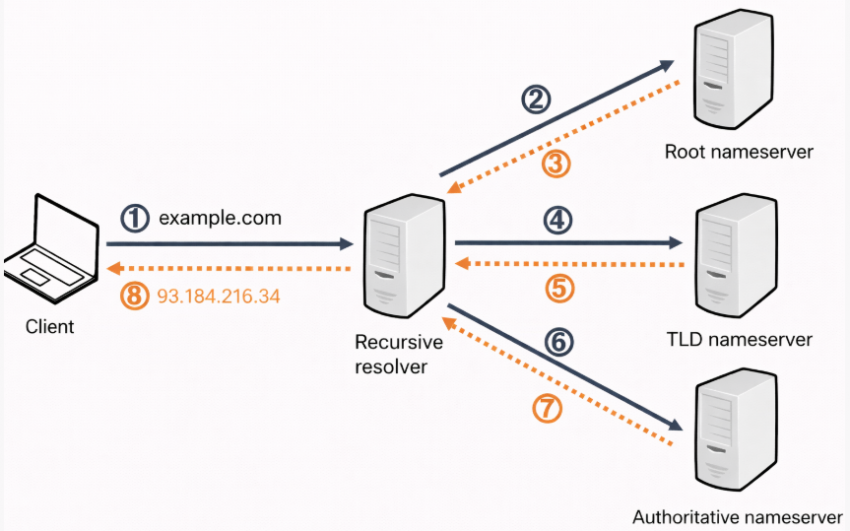
- DNS server – which resolver is translating domain names for you.
- Proxy and anonymizer detection – whether your traffic looks like it passes through a proxy, VPN, or Tor.
- IP blacklist status – whether your address appears on common blocklists.
- Browser fingerprint – User-Agent, HTTP headers, screen resolution, language, time zone, WebRTC status, plugins, and more.
Each block answers a different question. The IP section tells you where you appear to be. The fingerprint section tells you what device you appear to be. Together they form the two main layers that websites use to identify visitors.
How to Read the Whoer.net Homepage

What Is Whoer.net? IP, DNS & Fingerprint Checks Explained - How to Read the Whoer.net Homepage.
The IP and network block
The top of the page shows your public IP address alongside a country flag and city. Below that you will typically see:
- ISP – useful for confirming whether you are really going out through your home provider or through a VPN endpoint.
- DNS – if this shows a different country than your IP, that is a signal your traffic may be routed through a tunnel.
- Hostname – sometimes reveals hosting providers or mobile networks.
- OS and browser – detected from your User-Agent string.
- Proxy / Anonymizer – simple yes/no flags.
- Blacklist – whether your IP is flagged by common blocklists.
If you are troubleshooting a proxy or VPN, this block is the fastest sanity check. If the IP country and DNS country disagree, something in your setup is inconsistent.
The disguise score
Whoer.net condenses several signals into a single percentage called the disguise score (sometimes labeled "Your disguise"). It starts at 100% and subtracts points for mismatches such as:
- DNS server located in a different country than your IP.
- System time zone that does not match the IP's time zone.
- Browser or system language that does not fit the IP's country.
- Signs of tunneling or anonymization.
A high score means your connection looks internally consistent. A low score means your setup has visible contradictions that a website could flag. The score is not a security rating — it is a consistency rating. A perfectly consistent setup can still be detected if the IP itself is on a blocklist.
IP address details
The details tab expands the basic lookup into a fuller record: country, region, city, ZIP, hostname, IP range, ISP, and AS number. There is usually a Whois link for the registry record. This is useful when you want to verify where a VPN endpoint actually lives or who owns an IP that a website is seeing.
Browser fingerprint checker
The fingerprint section is where Whoer.net becomes relevant beyond simple IP checks. It displays:
- User-Agent and HTTP headers
- Screen size and color depth
- Language and time zone
- WebRTC and JavaScript status
- Installed plugins and fonts (depending on browser)
This matters because changing your IP alone does not change your fingerprint. If you rotate through ten proxies but keep the same browser fingerprint, websites can still link those sessions together. That is the core problem anti-detect browsers are built to solve.
Whoer.net vs an Anti-Detect Browser
What Is Whoer.net? IP, DNS & Fingerprint Checks Explained - Whoer.net vs an Anti-Detect Browser.
Whoer.net is a diagnostic tool. An anti-detect browser like AdsPower is a control environment. They serve different purposes and work well together.
| Aspect | Whoer.net | Anti-detect browser (e.g., AdsPower) |
|---|---|---|
| Primary function | Inspect what a site sees | Control what a site sees |
| IP handling | Reports current IP | Configures proxies per profile |
| Fingerprint | Displays fingerprint | Spoofs and isolates fingerprints |
| Multi-accounting | Not designed for it | Core use case |
| Persistence | One-off check | Saved, reusable profiles |
A practical workflow looks like this: create a browser profile in an anti-detect tool, assign a proxy, open Whoer.net inside that profile, and verify that the IP, DNS, time zone, language, and fingerprint all match the persona you intend to present. If the disguise score drops, you know which parameter to fix before logging into any account.
AdsPower, for example, lets you customize Canvas, WebGL, network, and User-Agent parameters per profile, so each identity has its own consistent fingerprint. Combined with a proxy, that gives you a setup where Whoer.net should report a clean, coherent result. You can see how this compares across tools in our top 10 antidetect browser ranking.
Practical Use Cases
What Is Whoer.net? IP, DNS & Fingerprint Checks Explained - Practical Use Cases.
Checking a VPN or proxy before work
Before logging into a client account, run the IP and DNS check. If the DNS country does not match the IP country, fix the resolver before proceeding. Mismatches are one of the easiest signals for platforms to detect.
Verifying a new browser profile
After setting up a new profile in an anti-detect browser, open Whoer.net inside it. Confirm that the fingerprint shown matches the profile's intended persona — same time zone, same language, same screen parameters. This is a five-second check that prevents hours of debugging later.
Diagnosing account flags
If an account gets flagged or suspended, Whoer.net can help you identify whether the issue is IP-related (blacklisted address, datacenter range) or fingerprint-related (inconsistent parameters). Our guide on bypassing account suspensions covers the fingerprint side in more depth.
Auditing your own privacy
Even without multi-accounting, Whoer.net is a quick way to see how much information your browser volunteers to every site you visit. The fingerprint tab is often surprising for first-time users.
Limitations to Keep in Mind
Whoer.net is a snapshot, not a monitoring service. It shows what your connection looks like at the moment you load the page. It does not:
- Track changes over time.
- Simulate how a specific platform's detection system works.
- Guarantee that a clean result means you will not be flagged.
- Replace a properly configured anti-detect environment.
Treat it as one input in a larger setup, not as a complete solution.
Related reading
- How to Use AdsPower with Anti Captcha: Setup & Workflow - Learn how to integrate Anti Captcha with AdsPower anti-detect browser: setup, API workflow, practical examples, and solving reCAPTCHA, Turnstile, and more.
- AdsPower vs BitBrowser vs Kameleo: Best Free Antidetect Browser? - AdsPower vs BitBrowser vs Kameleo compared for e-commerce, Facebook, Instagram, and TikTok multi-accounting. Free plans, fingerprints, automation, and pricing.
Sources and further reading
- What Is My IP Address? - What is my IP address and how to find IP address? Whoer shows your IP, location, ISP, and ZIP code. Fix leaks with our privacy score. Check your browser, DNS, and location.
- WHOER IP Lookup - Check IP Location, DNS & Privacy - WHOER provides complete IP address services, including privacy inspection, DNS leak search, and anonymous assessment.
- how to find IP address with one click – and what else is there? - Whoer.net shows what the internet sees about you in one place: what is my IP, how to find IP address, and more in a clear IP lookup. In this review we walk through the homepage block by block, explain every parameter in simple language.
FAQ
What is Whoer.net used for?
Whoer.net is used to check your public IP address, geolocation, ISP, DNS server, proxy status, blacklist status, and browser fingerprint. It is commonly used by people who work with VPNs, proxies, or multiple online accounts.
Is Whoer.net free?
Yes. The core IP lookup, DNS check, proxy detection, and fingerprint display are available for free without registration.
What does the Whoer disguise score mean?
The disguise score is a consistency rating from 0% to 100%. It drops when your DNS, time zone, or language do not match your IP's location. A high score means your setup looks internally coherent, not that you are anonymous.
Can Whoer.net detect a VPN?
Yes. Whoer.net compares your IP country with your DNS, time zone, and locale, and looks for tunneling signs. It also flags known datacenter and anonymizer ranges.
Does changing my IP hide my browser fingerprint?
No. Your IP and your fingerprint are separate layers. Changing IP without changing fingerprint can still allow websites to link sessions. Anti-detect browsers address this by isolating fingerprints per profile.
Is Whoer.net safe to use?
Whoer.net only displays data your browser and network already send with every request — IP, headers, and technical signals. It does not require installing software or submitting personal information.
Conclusion
Whoer.net is a fast, free way to see what the internet knows about your connection. Its IP lookup, DNS check, proxy detection, and fingerprint display make it a useful first step for anyone working with proxies, VPNs, or multiple accounts. But it is a mirror, not a mask. To actually control what websites see, you need an environment that manages IPs and fingerprints together — which is exactly what anti-detect browsers like AdsPower are built for. Use Whoer.net to verify, and an anti-detect browser to configure. Together they cover both sides of the problem.


