
RoxyBrowser Review 2026: Features, Pricing & Honest Verdict
Take a Quick Look
Evidence-based RoxyBrowser review covering features, pricing, pros and cons, ideal use cases, and user feedback. Find out if this antidetect browser fits your multi-account needs.
🔥 Limited-Time Offer! Save extra 10% off on your first monthly plan with code: Anitdetect10
Sign upRoxyBrowser Review 2026: Is It the Right Antidetect Browser for You?
RoxyBrowser has been gaining traction among affiliate marketers, social media managers, and e-commerce operators who need to run dozens of online accounts without getting flagged. But does it deliver the security and convenience that modern multi-account workflows demand? At AdsPower, we’ve dug into user feedback, tested the core features, and compared it with established alternatives to bring you an honest, evidence-based RoxyBrowser review. By the end, you’ll know exactly whether this antidetect browser fits your stack—or if you should look elsewhere.
What Is RoxyBrowser?
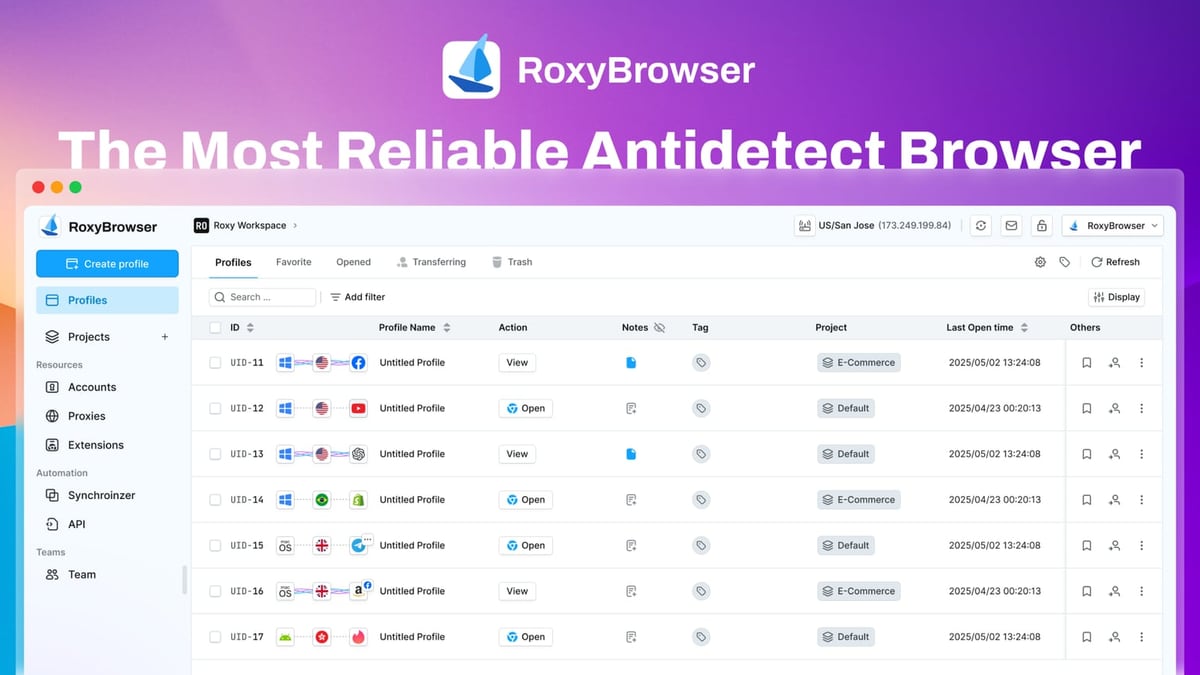
RoxyBrowser Review 2026: Features, Pricing & Honest Verdict product interface and feature overview.
RoxyBrowser is a Chromium-based antidetect browser built to create isolated digital identities for each of your online accounts. It generates unique browser fingerprints—covering Canvas, WebGL, WebRTC, font lists, and more—so that platforms like Facebook, Google, or Amazon see every profile as a distinct real user. While the interface feels familiar (much like Google Chrome), the real power lies under the hood: each profile stores its cookies, local storage, and custom settings separately, preventing cross-account leaks.
One notable architectural choice is that RoxyBrowser stores all profiles locally by default. There is no cloud sync or automatic backup; you’ll have to manually export and transfer profiles if you switch machines. This keeps you in total control but can slow down team collaboration. The browser itself does not come bundled with proxies, though it supports HTTP, HTTPS, SOCKS4, and SOCKS5. You can bring your own proxies—including RoxyIP if you choose their infrastructure—but configuration is entirely manual.
 RoxyBrowser’s clean profile management dashboard with colour‑coded isolation and bulk editing.
Who Should Use RoxyBrowser?

RoxyBrowser Review 2026: Features, Pricing & Honest Verdict product interface and feature overview.
RoxyBrowser is a practical choice for solo operators and small teams who value simplicity and local data control over sophisticated team orchestration. Here are its strongest use cases:
- Affiliate marketing: Run dozens of ad accounts across Facebook, Google Ads, or native networks without fingerprint overlaps. Test creatives and landing pages in different geo‑locations.
- Social media management: Safely manage multiple TikTok, Instagram, or Pinterest accounts for different clients from a single device.
- E‑commerce & dropshipping: Operate multiple seller accounts on Amazon, eBay, or Etsy without triggering linked‑account suspensions.
- SEO & SERP analysis: Perform unbiased rank tracking and competitor research by setting locale‑specific fingerprints and language headers.
- Web scraping & automation: Use the Puppeteer, Selenium, and Playwright integrations to control headless profiles for data collection tasks that require realistic fingerprints.
- Crypto & airdrop farming: Create isolated wallet and exchange profiles to qualify for multiple airdrops or manage trading accounts on platforms that frown upon multiple registrations.
If your workflow demands cloud‑synced profiles, built‑in no‑log residential proxies, or advanced team roles, you may outgrow RoxyBrowser quickly. We’ll cover alternatives later.
Setting Up RoxyBrowser in 5 Minutes
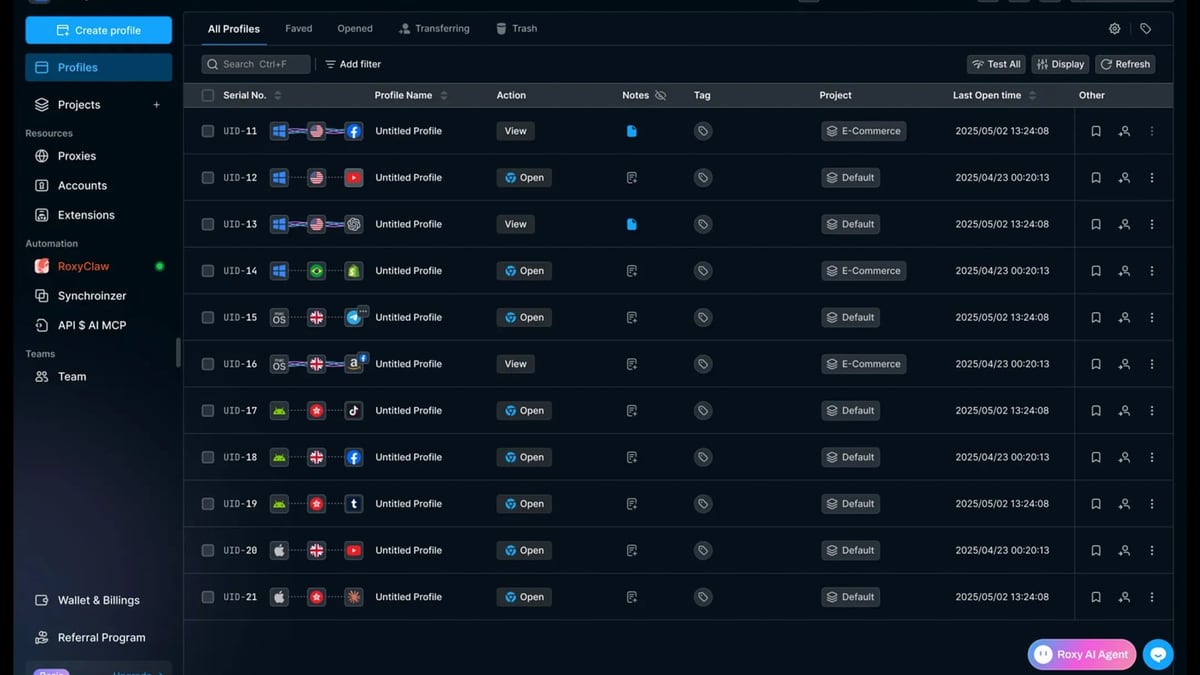
RoxyBrowser Review 2026: Features, Pricing & Honest Verdict product interface and feature overview.
Getting started is unusually fast compared to many antidetect browsers:
- Download and install the app from roxybrowser.com (Windows, macOS, or Linux).
- Sign up directly inside the app with your email—no complex KYC.
- Claim your free trial with 5 profiles, or choose a paid plan.
- Create your first profile by clicking “Create Profile.”
- Customise the fingerprint: set browser version, screen resolution, language, timezone, WebRTC behaviour, Canvas, WebGL, AudioContext, and user agent.
- Attach a proxy (HTTP/HTTPS/SOCKS) to complete the identity. Test the connection before launching.
- Launch the profile and start browsing.
Pro tip: name profiles descriptively (e.g., “FB‑ClientA‑US‑Resi”) and group them with the built‑in project folders and tagging system. This small habit will save hours when managing 50+ accounts.
Key Features That Matter in Daily Work
RoxyBrowser’s feature set focuses on fundamental multi‑account hygiene and basic automation rather than flashy extras:
- Granular fingerprint control – Modify all major fingerprint vectors individually or use one‑click presets. The isolation is consistent across sessions, reducing the risk of leaks.
- Automation engine – Headless browser automation via Puppeteer, Selenium, and Playwright lets you script repetitive tasks like form filling or checkout testing.
- Team Workspaces – Invite colleagues, assign profiles, and manage permissions in shared workspaces. However, without cloud profiles, everyone works on the same local machine or manually transfers files.
- Bulk profile operations – Create, update, or delete tens of profiles in a few clicks, a real time‑saver for large‑scale campaigns.
- Profile notes – Keep account credentials, recovery codes, or campaign notes encrypted inside the profile for quick reference.
- Cross‑platform compatibility – Runs natively on Windows and macOS, with a Linux beta available.
- Import/Export – Move profiles between machines via encrypted backup files, though this remains a manual process.
RoxyBrowser Pricing and Plans
RoxyBrowser Review 2026: Features, Pricing & Honest Verdict product interface and feature overview.
RoxyBrowser offers a tiered subscription model that starts at zero cost for evaluation. While exact prices may change, the typical structure looks like this:
| Plan | Profiles | Key Features | Price |
|---|---|---|---|
| Free | 5 | Basic fingerprint management, community support | $0 |
| Starter | 50 | Automation API, workspaces, priority support | ~$10/month |
| Professional | 150 | Bulk operations, team management, advanced fingerprints | ~$30/month |
| Enterprise | Custom | Dedicated support, custom integrations, SLA | Contact sales |
Note: All paid plans come with a 7‑day free trial of premium features. Proxies are not included; you’ll need a separate provider, which adds to the total cost.
For the most accurate pricing, check RoxyBrowser’s official site, as these figures are indicative based on early‑2026 data.
What Users Are Saying: Trustpilot and G2 Feedback
We analysed recent reviews on Trustpilot and G2 to gauge real‑world sentiment. The consensus picture:
- Positives: Users consistently praise the lightweight design, intuitive interface, and responsive support team. Many appreciate that it doesn’t hog system resources, even with 20–30 profiles open. Small business owners and affiliate beginners find the learning curve gentle.
- Criticisms: The most common complaints are the lack of cloud profile sync (a dealbreaker for remote teams) and the absence of built‑in proxies. Some advanced automation users note that documentation could be deeper. Several reviews mention that the UI borrows heavily from GoLogin, which raises questions about long‑term innovation.
Taken together, RoxyBrowser earns a solid 4.0‑4.5 rating on both platforms—strong for a newcomer, but behind established players.
RoxyBrowser Pros and Cons
Pros
- Clean, beginner‑friendly interface with short onboarding time.
- Reliable local fingerprint isolation for straightforward multi‑account needs.
- Works on Windows, macOS, and Linux—not just Windows.
- Active development with regular updates.
- Affordable entry price compared to enterprise‑grade competitors.
Cons
- No cloud profile storage—you must manually transfer profiles between computers.
- Proxies sold separately; configuration is manual, and incompatible providers can cause leaks.
- Advanced documentation is sparse, leaving power users to figure things out via trial and error.
- Performance can dip when running 50+ profiles simultaneously on modest hardware.
- No Firefox‑based engine; only Chromium fingerprints are supported.
RoxyBrowser vs. Alternatives: How to Choose
If RoxyBrowser’s local‑first approach and missing cloud sync give you pause, you’re not alone. Here’s a quick decision map:
- For teams needing cloud profiles, real‑time sync, and built‑in residential proxies: Multilogin remains the industry benchmark. Read our in‑depth Multilogin review for a feature‑by‑feature walkthrough.
- For automation‑heavy users who want native proxy integration and flexible fingerprinting: The AdsPower vs. Multilogin vs. Genlogin landscape is worth a closer look. Our dedicated comparison breaks down which browser excels at scale.
- For budget‑conscious users who still want cloud sync and a larger template library: GoLogin or Incogniton often deliver more cloud convenience at a similar price point.
RoxyBrowser holds its ground when you need a lightweight, inexpensive tool for basic multi‑account separation on a single machine—especially if you already have a trusted proxy pool. But if you expect your operation to grow into a multi‑member, multi‑location team, you’ll likely graduate to a cloud‑enabled solution sooner rather than later.
Related reading
- Top 10 Virtual Phone Number SMS Verification Services 2026 - We rank the 10 best SMS verification services of 2026 with a focus on non-VoIP reliability, global number pools, API access, and cost. Compare 5SIM, Quackr, and more.
- How to Use AdsPower Fingerprint Browser with Proxyrack - Step-by-step guide to integrating Proxyrack proxies with AdsPower for secure multi-account management, covering setup, use cases, and troubleshooting proxy failures.
Sources and further reading
- RoxyBrowser Review 2026: Pros and Cons - Discover RoxyBrowser's features, performance, and a detailed comparison with Multilogin in 2026. Get a 50% discount inside!
Frequently Asked Questions
Is RoxyBrowser completely free?
It offers a free plan with 5 profiles and basic features. Full functionality requires a paid subscription, but you can test premium features with a 7‑day trial.
Does RoxyBrowser work on macOS?
Yes. RoxyBrowser supports macOS, Windows, and has a Linux beta. The installation and interface are nearly identical across platforms.
Can I use RoxyBrowser to manage multiple Facebook accounts?
Absolutely. The isolated fingerprinting makes it suitable for managing multiple Facebook profiles, ad accounts, or Business Manager roles without linking them, as long as each profile has a unique, clean proxy.
Does RoxyBrowser include proxies?
No. You need to purchase and configure proxies separately. RoxyBrowser is compatible with most HTTP, HTTPS, SOCKS4, and SOCKS5 providers, but misconfigurations can expose your real IP.
Final Verdict: Should You Choose RoxyBrowser?
RoxyBrowser is a capable entry‑level antidetect browser that gets the fundamentals right. Its fingerprint isolation is solid, the interface is polished, and the price is easy to swallow for freelancers and small teams. If your daily routine involves running a few dozen accounts from one Windows or Mac machine and you don’t mind manually configuring proxies, it will serve you well.
However, the absence of cloud sync, built‑in proxy integration, and a Firefox engine limit its appeal for larger or distributed teams. Before committing, evaluate whether a more mature, cloud‑synced alternative would save you hours of manual work in the long run.
At AdsPower, our verdict is: RoxyBrowser is a good starting point, but growing businesses may outpace it quickly. Take advantage of the free trial, test your most sensitive account workflows, and then decide if it can scale with you.