
FBA Fulfillment Explained: Costs, Steps & Seller Workflow
Take a Quick Look
Learn how FBA fulfillment works, what it costs, how to send inventory, and how multi-account sellers manage FBA operations safely at scale.
FBA Fulfillment Explained: How It Works, What It Costs, and How Sellers Scale
FBA fulfillment is the process of sending your inventory to Amazon and letting Amazon store, pick, pack, ship, and handle customer service for every order. For many sellers, it replaces a warehouse, a packing team, and a customer support inbox with a per-unit fee.
This article breaks down how FBA fulfillment actually works, what drives your costs, where sellers get stuck, and how high-volume or multi-account operators keep their fulfillment workflows organized.
What Is FBA Fulfillment?

FBA Fulfillment Explained: Costs, Steps & Seller Workflow - What Is FBA Fulfillment?.
Fulfillment by Amazon (FBA) is an order fulfillment service operated by Amazon. Third-party sellers ship products into Amazon's fulfillment network, and Amazon handles storage, packing, shipping, returns processing, and customer service on their behalf.
The service launched in 2006 and has since expanded into programs like FBA Export, Pan-European FBA, and Multi-Channel Fulfillment (MCF), which lets sellers use FBA inventory to fulfill orders from external sales channels such as their own storefront.
In short: you own the inventory, Amazon owns the logistics.
What FBA fulfillment covers
- Storage in Amazon fulfillment centers
- Picking and packing customer orders
- Shipping, including Prime-eligible delivery
- Customer service for FBA orders
- Returns and exchanges
What it does not cover
- Sourcing or manufacturing your products
- Product preparation and labeling (increasingly the seller's responsibility)
- Listing creation and catalog management
- Advertising and demand generation
How FBA Fulfillment Works: Step by Step
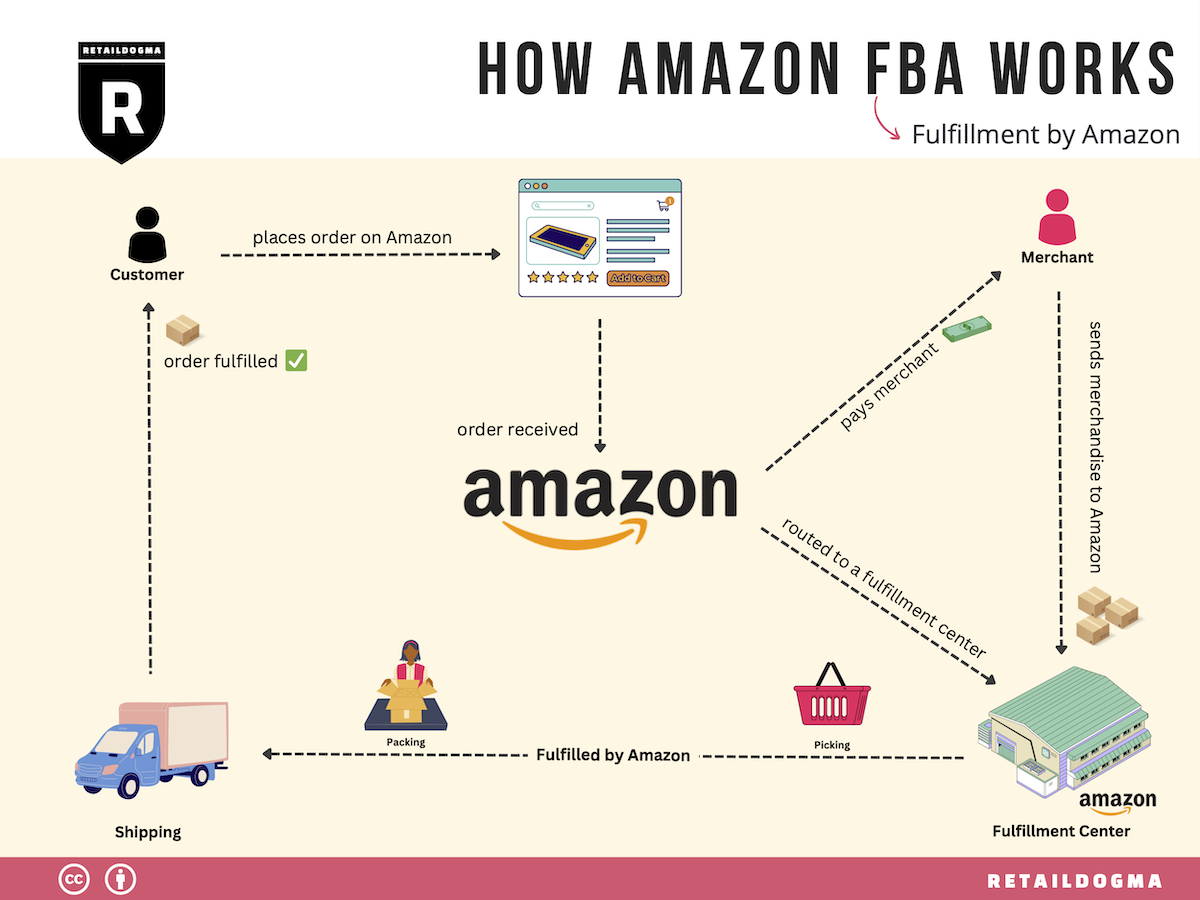
FBA Fulfillment Explained: Costs, Steps & Seller Workflow - How FBA Fulfillment Works: Step by Step.
Step 1: Register for FBA
If you already sell on Amazon, you can add FBA to your existing seller account. New sellers need a Professional selling plan first, then enroll through Seller Central.
Step 2: List products and assign them to FBA
You can enroll some or all eligible products. Before committing, check FBA product restrictions and policies, and estimate costs with Amazon's Revenue Calculator. You can assign products to FBA during listing creation or convert an existing merchant-fulfilled listing.
Step 3: Prepare and ship inventory
Amazon's Send to Amazon workflow guides you through shipment creation: preparing, packing, labeling, and routing inventory to a fulfillment center. Since Amazon discontinued U.S. FBA prep and labeling services effective January 1, 2026, inventory must arrive fully prepared and labeled — often through a third-party prep provider.
Step 4: Amazon receives and stores your inventory
Once received, products become available for purchase. Amazon stores them and manages the physical fulfillment process from that point forward.
Step 5: Orders ship and returns are handled
When a customer orders, Amazon picks, packs, and ships the item, then handles customer service and returns for that order.
Step 6: Manage inventory health
Use the FBA Dashboard, Restock tool, and Replenishment Alerts to keep popular products in stock and avoid long-term storage costs. Amazon's Inventory Performance Index (IPI) scores sellers from 0 to 1,000 based on excess inventory, stranded inventory, and in-stock rates — and that score affects your storage capacity.
FBA Fulfillment Costs: What You Actually Pay For

FBA Fulfillment Explained: Costs, Steps & Seller Workflow - FBA Fulfillment Costs: What You Actually Pay For.
FBA fees are not a single number. They stack based on product characteristics and how you operate.
| Cost type | What triggers it |
|---|---|
| Fulfillment fees | Per-unit picking, packing, shipping, and customer service, based on size and weight |
| Monthly storage fees | Cubic footage your inventory occupies, averaged daily |
| Aged inventory surcharge | Items stored longer than 181 days |
| Inbound placement service fee | Distributing inventory across fulfillment centers to shorten delivery times |
| Low-inventory-level fee | Inventory that is too low relative to customer demand |
| Returns processing | Orders where Amazon provides free return shipping |
| Removal, disposal, or liquidation | Per-item charge to clear inventory from a fulfillment center |
A practical cost example
Imagine you sell a standard-size product weighing under one pound. Your per-unit fulfillment fee is relatively low, but if you ship a large inbound batch in January and only sell half of it by July, you will pay monthly storage on the remainder plus an aged inventory surcharge after day 181. The product itself was profitable; the timing was not.
That is the core lesson of FBA economics: inventory velocity matters as much as unit margin.
Ways to reduce FBA costs
- Use the Revenue Calculator before committing to a product
- Keep inventory moving to avoid aged surcharges
- Consider Amazon Warehousing and Distribution (AWD) for low-cost bulk storage with auto-replenishment into FBA
- Monitor IPI to protect your storage limits
- Use FBA Liquidations for slow movers instead of paying removal fees
FBA vs. Merchant Fulfilled: How to Decide
You do not have to choose one channel. Amazon allows you to offer a product through both FBA and merchant fulfillment simultaneously by creating a unique SKU for each channel — for example, appending -FBA to the FBA SKU.
| Factor | FBA | Merchant fulfilled |
|---|---|---|
| Prime eligibility | Yes | No (unless Seller Fulfilled Prime) |
| Customer service | Handled by Amazon | Handled by you |
| Storage cost | Monthly, based on volume | Your own warehouse or 3PL |
| Control over packaging | Limited | Full |
| Best for | Consistent sellers chasing conversion | Bulky, slow-moving, or custom items |
A common hybrid strategy: run your bestsellers through FBA for Prime visibility, and keep oversized or seasonal SKUs merchant fulfilled to avoid storage penalties.
Where FBA Fulfillment Gets Complicated
FBA solves logistics. It does not solve operations.
Multi-marketplace inventory
Pan-European FBA lets sellers store inventory in France, Germany, Italy, Spain, or Poland while Amazon redistributes stock based on projected demand. That is convenient — and it also means your inventory is spread across marketplaces with different fee structures and tax rules.
Multi-account operations
Many agencies and aggregators run several seller accounts across regions. Each account carries its own Seller Central session, its own payment and tax profile, and its own risk profile. Logging into multiple accounts from one browser without isolation is one of the fastest ways to trigger account linkage reviews.
This is where an anti-detect browser becomes part of the fulfillment stack rather than a marketing gimmick. Tools like AdsPower create isolated browser profiles with unique fingerprints — Canvas, WebGL, network, and user agent parameters — so each seller account operates in its own consistent environment on a single machine. For teams managing multiple storefronts, profile syncing and batch management reduce the friction of switching between accounts without mixing sessions.
If you are comparing options, this independent 2026 ranking of antidetect browsers scores platforms on fingerprint consistency, automation, and pricing, and this AdsPower vs Multilogin comparison breaks down where each fits a multi-accounting workflow.
Automation and scheduled tasks
FBA sellers repeat the same actions daily: check inventory levels, download reports, update listings, monitor Buy Box status. Automation tools — including scheduled tasks and AI agents — can handle routine checks so your team focuses on sourcing and pricing decisions instead.
For sellers who also run technical testing or scraping alongside their storefronts, connecting AdsPower profiles with Playwright shows how isolated profiles support stable, geo-sensitive workflows.
A Realistic FBA Fulfillment Workflow
Here is what a disciplined weekly cycle looks like for a mid-volume seller:
- Monday: Review IPI, restock alerts, and stranded inventory in Seller Central.
- Tuesday: Create or adjust inbound shipments; confirm prep and labeling compliance with your prep provider.
- Wednesday: Check aged inventory approaching 181 days; route slow movers to liquidation or a removal order.
- Thursday: Reconcile fulfillment fees against the Revenue Calculator estimates; flag SKUs with shrinking margins.
- Friday: Update listings, review returns reasons, and adjust pricing on low-velocity items.
Run this cycle consistently and FBA stops being a black box. Skip it for a quarter and storage fees quietly eat your margin.
Related reading
- Top 10 Antidetect Browser & Cloud Phone Software 2026 - Independent 2026 ranking of the top 10 antidetect browsers and cloud phone platforms for multi-account management, scored on fingerprints, mobile support, automation, and pricing.
- How to Use AdsPower with Playwright for Reliable E2E Testing - Learn how to connect AdsPower anti-detect profiles with Playwright for stable, isolated end-to-end testing of multi-account and geo-sensitive web apps.
- AdsPower vs Incogniton vs Dolphin Anty: Multi-Accounting Guide - Compare AdsPower, Incogniton, and Dolphin Anty for multi-accounting: fingerprints, automation, team tools, free plans, and pricing to pick the right fit.
Sources and further reading
- Amazon FBA (Fulfillment by Amazon) | Sell on Amazon - Use Fulfillment by Amazon (FBA) to store, pick, pack, and ship customer orders. You send products to Amazon and we take care of the rest, including returns and customer service.
- Get started with Fulfillment by Amazon (FBA) - This article applies to selling in: United States
- Fulfillment by Amazon - From Wikipedia, the free encyclopedia
Frequently Asked Questions
What does FBA fulfillment mean?
FBA fulfillment means Amazon stores your products, then picks, packs, ships, and provides customer service for orders placed on your listings. You send inventory in; Amazon handles the rest of the physical order process.
How much does FBA fulfillment cost per item?
It depends on the product's size tier, weight, and price. Fulfillment fees are charged per unit, and storage fees are charged monthly based on the cubic footage your inventory occupies. Amazon's Revenue Calculator gives a product-specific estimate.
Do I need a Professional selling plan for FBA?
Yes. FBA requires a Professional selling plan, which also unlocks eligibility for programs like FBA Export and Multi-Channel Fulfillment.
Can I use FBA and ship orders myself at the same time?
Yes. Create a separate SKU for each fulfillment channel — for example, one merchant-fulfilled SKU and one FBA SKU — rather than toggling a single SKU between channels.
What happens if my inventory sits in a fulfillment center too long?
Amazon charges an aged inventory surcharge on items stored longer than 181 days. You can avoid it by improving sell-through, using FBA Liquidations, or creating a removal or disposal order.
Can I manage multiple Amazon seller accounts from one computer?
Technically yes, but each account needs a separate, consistent browser environment. Anti-detect browsers create isolated profiles with distinct fingerprints so sessions do not overlap — which is the operational reason multi-account sellers use them.
Conclusion
FBA fulfillment is a trade: you give up control over packing and shipping in exchange for Prime eligibility, global reach, and a logistics network you could never build alone. The sellers who win with it are not the ones with the lowest fees — they are the ones who treat inventory velocity, IPI, and account hygiene as one system.
Start with the Revenue Calculator, keep your inventory moving, and if you operate more than one storefront, make sure each account has its own clean, isolated environment before you scale.


