
What Is BitBrowser? Anti-Detect Browser Explained (2026)
Take a Quick Look
BitBrowser is an anti-detect browser for managing multiple accounts with isolated fingerprints. Learn how it works, key features, pricing, and how it compares.
🔥 Limited-Time Offer! Save extra 10% off on your first monthly plan with code: Anitdetect10
Sign upWhat Is BitBrowser? Anti-Detect Browser Explained (2026)
If you manage more than one account on the same platform, you've probably run into the same wall: log in from one device too often and the platform starts linking your accounts. BitBrowser is one of several tools built to solve that problem. This article explains what BitBrowser actually is, how its fingerprint isolation works, what it costs, and where it fits compared to other anti-detect browsers.
What Is BitBrowser?
What Is BitBrowser? Anti-Detect Browser Explained (2026) - What Is BitBrowser?.
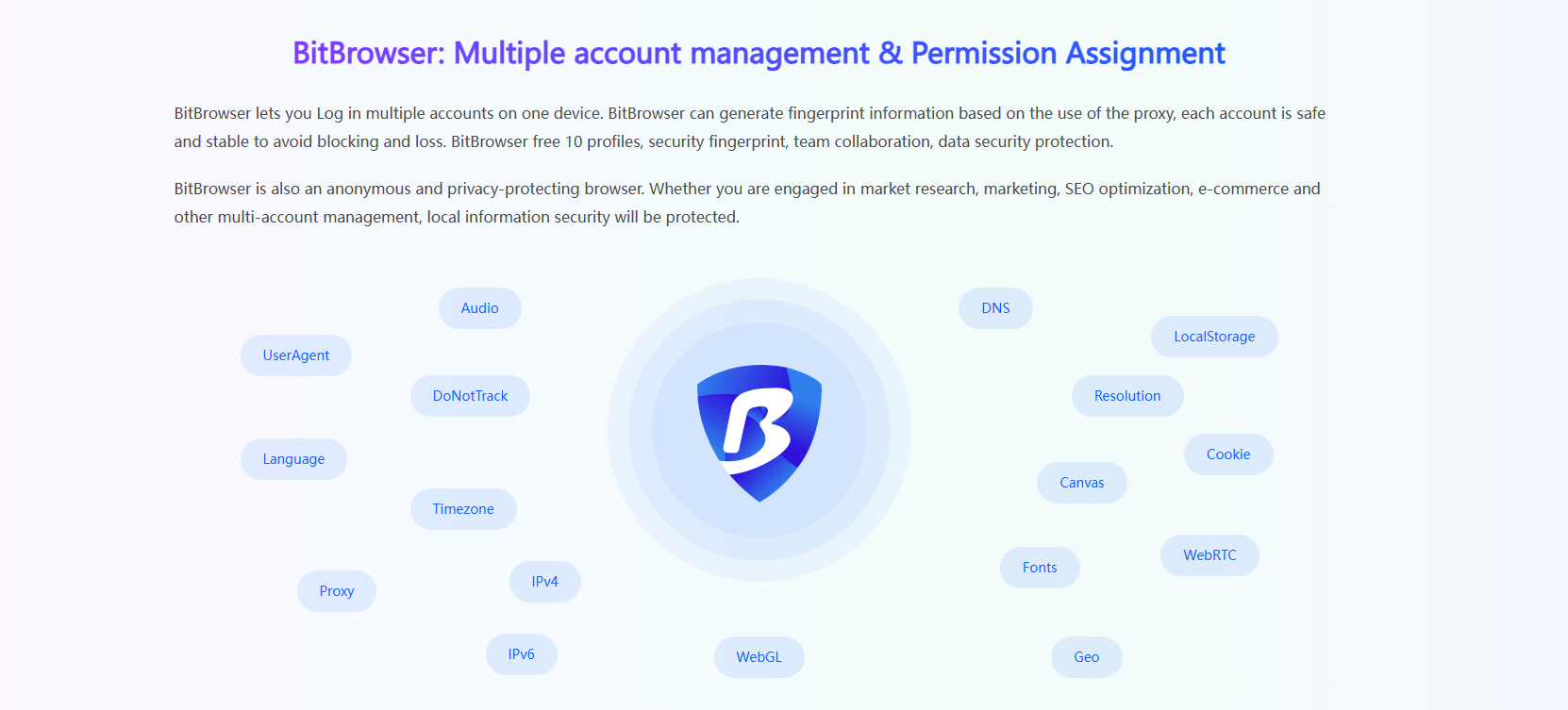
BitBrowser is an anti-detect browser — sometimes called a fingerprint browser — designed to let you run multiple accounts on one device without those accounts being associated with each other.
A normal browser (including incognito mode) still exposes the same underlying fingerprint: your Canvas rendering, WebGL output, fonts, screen resolution, timezone, and dozens of other signals. Platforms combine those signals into a device identity. Incognito clears cookies, but it does not change that identity.
BitBrowser takes a different approach. Each profile you create runs in an isolated environment with its own generated fingerprint and its own cookies, local storage, and session data. When you attach a proxy to a profile, the fingerprint is generated to match the proxy's location, so the account appears to be operated from a consistent, believable device.
This is the same core mechanism used by every tool in this category. The differences between products come down to how many fingerprint parameters they expose, how stable the profiles are over time, and what automation and team features sit on top.
Who typically uses it
- E-commerce sellers running multiple storefronts on marketplaces like Amazon
- Social media marketers managing client or brand accounts on Facebook, Instagram, and TikTok
- Affiliate marketers operating campaign accounts across ad platforms
- Agencies and studios that distribute account work across team members
How BitBrowser Works
What Is BitBrowser? Anti-Detect Browser Explained (2026) - How BitBrowser Works.
Fingerprint generation and isolation
When you create a profile, BitBrowser generates a fingerprint covering parameters such as User-Agent, language, timezone, WebGL, Canvas, Audio, WebRTC, DNS, fonts, screen resolution, and hardware signals. Each profile's data stays separate from every other profile, so cookies and sessions never mix.
Proxy binding
IP reputation matters as much as the fingerprint. BitBrowser supports HTTP, HTTPS, and SOCKS5 proxies, and lets you bind a proxy permanently to a profile so the account always connects from the same location. Batch proxy import is available for larger account sets. If you want a deeper walkthrough of pairing an anti-detect browser with residential or ISP proxies, see our guide on using AdsPower with IPRoyal, which covers the same proxy-to-profile workflow.
Dual browser engines
BitBrowser ships with both Chrome and Firefox engine options. Different platforms use different tracking methods, so having two engines gives you flexibility when a site behaves inconsistently in one of them.
Cloud Phone
One feature that separates BitBrowser from most competitors is BitCloudPhone — cloud-hosted Android devices that you can operate alongside browser profiles. This matters for platforms where mobile app behavior differs from web behavior, such as TikTok or Instagram. Instead of simulating a mobile browser, you run the actual app on a real Android system in the cloud.
Automation and synchronizer
BitBrowser includes built-in RPA for repetitive tasks like logins, routine checks, and data collection, plus a Synchronizer that mirrors actions from one window across many profiles at once. There is also API access for custom automation pipelines. If programmatic control is your priority, our Scrapy integration guide for AdsPower shows how a Local API approach works in practice with a fingerprint browser.
Team collaboration
Administrators can assign profiles to team members with role-based permissions, keeping raw credentials hidden from operators. This is the feature set agencies care about most, since it removes the need to share account passwords directly.
BitBrowser Pricing
What Is BitBrowser? Anti-Detect Browser Explained (2026) - BitBrowser Pricing.
BitBrowser's most-cited advantage is its free tier: 10 browser profiles permanently free, with team collaboration included. Most competing tools either cap free profiles lower or only offer short trials.
Paid tiers scale by profile count — commonly cited at roughly $10/month for 50 profiles, $15/month for 100, and $25/month for 200. Cloud Phone is billed separately, starting at a low per-day rate per device.
The practical takeaway: BitBrowser is priced aggressively at the entry level. Whether that matters depends on how many profiles you actually need and which features you can't do without.
BitBrowser vs Other Anti-Detect Browsers
What Is BitBrowser? Anti-Detect Browser Explained (2026) - BitBrowser vs Other Anti-Detect Browsers.
The honest answer is that no single tool wins across every use case. Here's how to think about the decision:
| Consideration | What to check |
|---|---|
| Free tier | How many permanent profiles, and are team features included? |
| Fingerprint depth | How many parameters can you customize per profile? |
| Automation | Built-in RPA, API access, or both? |
| Mobile support | Cloud Android devices, or browser-only simulation? |
| Team controls | Role-based permissions without credential sharing? |
| Price at scale | Cost per profile as your account count grows |
BitBrowser's strengths cluster around price-to-profile ratio and the Cloud Phone integration. Where it may feel limiting is if you need very deep automation or enterprise-grade collaboration controls. For a side-by-side look at how the major fingerprint browsers differ on isolation, automation, and pricing, our AdsPower vs Octo Browser vs Maskfog comparison breaks down the trade-offs.
If your work is primarily browser-based multi-account management with proxy integration, team seats, and automation, AdsPower is another established option in this category — it creates isolated environments with unique fingerprints across Canvas, WebGL, User-Agent, and IP, and supports proxy integration, RPA, Local API, and cross-device sync. The right choice depends on which specific features your workflow depends on.
Common Mistakes When Starting with BitBrowser
- Reusing the same proxy across profiles. The fingerprint may be unique, but a shared IP re-links the accounts instantly. One proxy per profile.
- Changing a profile's proxy location after setup. Sudden location jumps look suspicious. Bind the proxy before you log in for the first time.
- Ignoring fingerprint consistency. A profile claiming to be a US Windows device with a European timezone is a red flag. Let the tool generate a coherent fingerprint rather than overriding individual parameters randomly.
- Skipping behavioral realism. Fingerprints and IPs are only part of the picture. Platforms also watch behavior patterns — logging into 40 accounts in ten minutes from one operator looks automated regardless of how clean the fingerprints are.
Related reading
- How to Use AdsPower with Scrapy: Setup, Workflow & Examples - Combine AdsPower anti-detect profiles with Scrapy spiders to scrape at scale without blocks. Step-by-step setup, Local API code, and practical examples.
- ScraperAPI Pricing 2026: Plans, Credits & Real Costs - ScraperAPI pricing explained: free tier, credit multipliers, plan limits, overage options, and how to estimate your true monthly scraping cost in 2026.
- How to Use AdsPower with IPRoyal: Setup, Workflow & Tips - Learn how to use AdsPower with IPRoyal proxies: configure residential, mobile, or ISP proxies, attach them to profiles, verify fingerprints, and scale multi-account work.
Sources and further reading
- BitBrowser - Best Free Antidetect Browser for E-Commerce/FB/Ins/Tiktok - BitBrowser is an undetectable browser that lets you easily create a unique and stable fingerprint for multiple accounts on any platform. Take a shot and you'll see.
- BitBrowser Review & Tutorial | Best Anti-Detect Browser + Cloud Phone for Multi-Account Management - BitBrowser Full Review & Tutorial | Free Antidetect Browser and Cloud Phone for Multiple Account Management without Getting Banned!🎯 Start Using BitBrowser ...
- BitBrowser Review 2026: Is It Worth Buying for Your Multi-Account Business - Discover BitBrowser, a powerful antidetect browser for managing multiple accounts safely. Learn about its fingerprint simulation, proxy support, automation tools, and free plan with 10 browser profiles.
Frequently Asked Questions
Is BitBrowser free?
Yes, it offers 10 browser profiles permanently free, including team collaboration features. Paid plans add more profiles and scale in price by profile count.
Is BitBrowser the same as incognito mode?
No. Incognito mode clears cookies but leaves your browser fingerprint unchanged. BitBrowser generates a separate fingerprint and isolated storage for each profile, so accounts don't share a device identity.
Can BitBrowser run mobile apps?
Yes, through BitCloudPhone — cloud-hosted Android devices that run alongside your browser profiles. This is billed separately from browser profiles.
Do I need technical skills to use it?
No. Profile creation and proxy assignment are handled through a graphical interface. Automation features like RPA and API access are optional and aimed at users who want to script workflows.
Can I use BitBrowser for Amazon or TikTok accounts?
Those are among the most common use cases. The tool is built for multi-account operations on marketplaces and social platforms, though results always depend on how consistently you manage proxies, fingerprints, and behavior.
What's the main limitation?
Fingerprint browsers reduce association risk; they don't eliminate platform enforcement. If your accounts violate platform policies, no fingerprint tool will protect them. Treat these tools as infrastructure, not immunity.
Conclusion
BitBrowser is an anti-detect browser that creates isolated browser profiles with unique fingerprints, binds proxies per profile, and adds automation, team collaboration, and cloud Android devices on top. Its main draw is a permanent free tier of 10 profiles and competitive pricing as you scale.
If you're evaluating it, the decision usually comes down to three questions: how many profiles you need, whether Cloud Phone matters for your platforms, and how much automation depth your workflow requires. Compare it against at least one alternative before committing — the feature sets overlap heavily, and the differences that matter are specific to your operation.